





L’option Dossiers dans Document Library Pro hébergé contrôle la structure globale d’une bibliothèque. Vous l’activez ou la désactivez pour chaque bibliothèque dans le Library Builder.
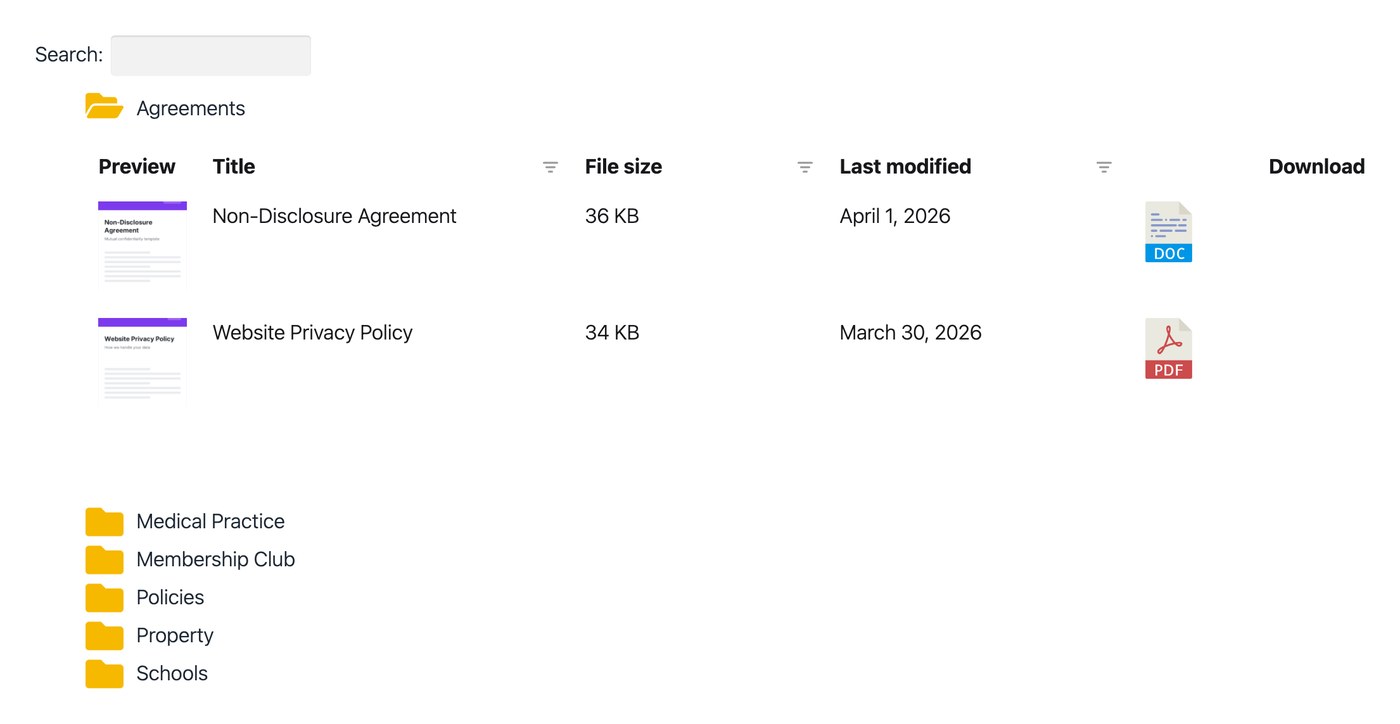
Dossiers désactivés
This is the default. It lists all your documents together, regardless of category. You can turn dossiers off in the Bibliothèque Builder.
Dossiers activés
This arranges the bibliothèque into a dossier tree built from your document catégories, sub-catégories and so on. Visiteurs can drill down through the tree by category.
When a visitor clicks a dossier, they see the documents in that category and any sub-category dossiers. Clicking a sub-category shows the documents within it, and so on.
The dossiers are collapsible, and only one is ever open at a time. This keeps the bibliothèque easy to navigate so visiteurs never lose their place. You can turn dossiers on in the Bibliothèque Builder.
État du dossier
Par défaut, chaque dossier est fermé lors du premier chargement de la bibliothèque. En utilisant le Affichage des dossiers dans l’onglet Affichage de vos réglages, vous pouvez à la place ouvrir tous les dossiers, ou choisir des dossiers précis à ouvrir pendant que les autres restent fermés.
Ajouter votre propre icône de dossier
Document Library Pro hébergé inclut une icône de dossier intégrée. Les dossiers de premier niveau sont jaunes et les sous-dossiers sont noirs. Dans l’onglet Conception de la bibliothèque de vos réglages, vous pouvez modifier la couleur des icônes de dossier ou les remplacer par votre propre icône.
Choosing which catégories to include in the dossiers
By default, all your document catégories appear in the dossier list. For more control, use the Bibliothèque Builder to scope a bibliothèque to specific catégories, which also determines which dossiers appear.
Modifier l’ordre de tri des dossiers
Vous pouvez réordonner la liste des dossiers de plusieurs façons. Voir tri des dossiers.
Limites
Dossier view does not support filtres. If you need filtre liste déroulantes above the bibliothèque, keep dossiers switched off.
FAQ
Does it support sub-catégories?
Oui. Sub-catégories are indented to show the structure, and you can nest as many levels as you like, as long as the page is wide enough to display them. When a category has both documents and sub-catégories, the documents that belong only to the parent appear first, followed by the nested sub-category dossiers.
Can a document appear in multiple dossiers?
Oui. A document in several catégories appears in each matching dossier. The exception is when it is in both a parent category and its child, in which case it only appears in the child.
Puis-je add a search option to the dossier view?
Oui. If you enable the champ de recherche, it appears above the dossier list so visiteurs can search across all dossiers at once. The results show as a flat list of documents rather than in dossiers, and visiteurs can use the Reset bouton to return to the dossier view. Learn more about the logique de recherche when dossiers are enabled.