





Je bibliotheek actueel houden is belangrijk, zodat bezoekers altijd de nieuwste versie van elk bestand bereiken. Wanneer een document in je organisatie verandert, maakt je gehoste Document Library Pro-bibliotheek het snel om de nieuwe versie te plaatsen. Documenten die zijn gesynchroniseerd vanuit een Google Drive- of Dropbox-map werken zichzelf bij: vervang gewoon het bestand in de map en de wijziging wordt automatisch gesynchroniseerd.
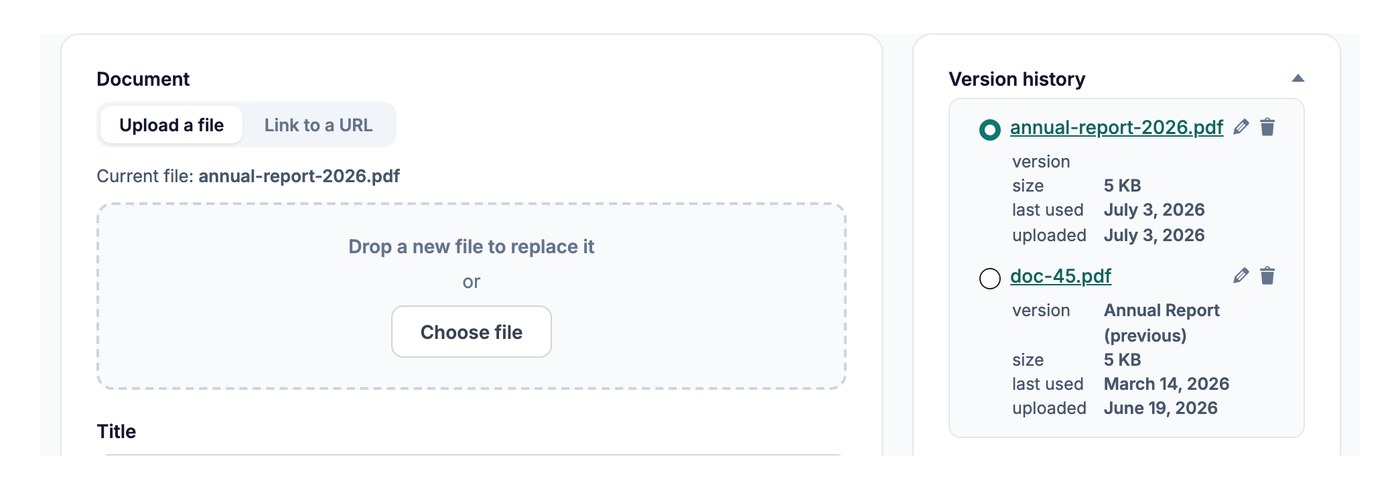
Het bestand op het document vervangen
Om een document bij te werken, open je het via Documenten → Mijn documenten en vervang je het bestand:
- Open het document dat je wilt bijwerken vanuit je dashboard.
- Klik Bestand vervangen en upload de nieuwe versie, of plak een nieuwe link als het bestand elders online staat.
- Sla het document op.
De downloadlink verwijst nu naar het bijgewerkte bestand, zonder dat er andere wijzigingen nodig zijn.
Oudere versies bewaren
Als versiebeheer is ingeschakeld en Bestanden vervangen is ingesteld om het origineel te behouden, blijft de eerdere versie bewaard wanneer je een bestand vervangt, zodat je later kunt bekijken wat er is veranderd. Versiebeheer is een Geavanceerd plan Functie.