





Ci sono due modi per aggiungere una libreria Document Library Pro a un sito Wix. L'opzione più semplice è usare App Document Library Pro per Wix, che aggiunge la libreria come widget Wix. Il codice di incorporamento universale funziona comunque se preferisci aggiungere la libreria manualmente. Questo articolo copre prima il metodo dell'app Wix, poi il metodo del codice di incorporamento.
Aggiungere la libreria con l'app Wix
- Installa la app Document Library Pro dal Wix App Market. Scegli un piano per avviare la prova gratuita di 14 giorni, fatturata tramite Wix. L'app crea la tua libreria di documenti per te.
- Apri l'email di benvenuto e fai clic su Imposta la tua password. È così che accedi per gestire i tuoi documenti.
- Apri nell'editor Wix la pagina in cui vuoi visualizzare la libreria.
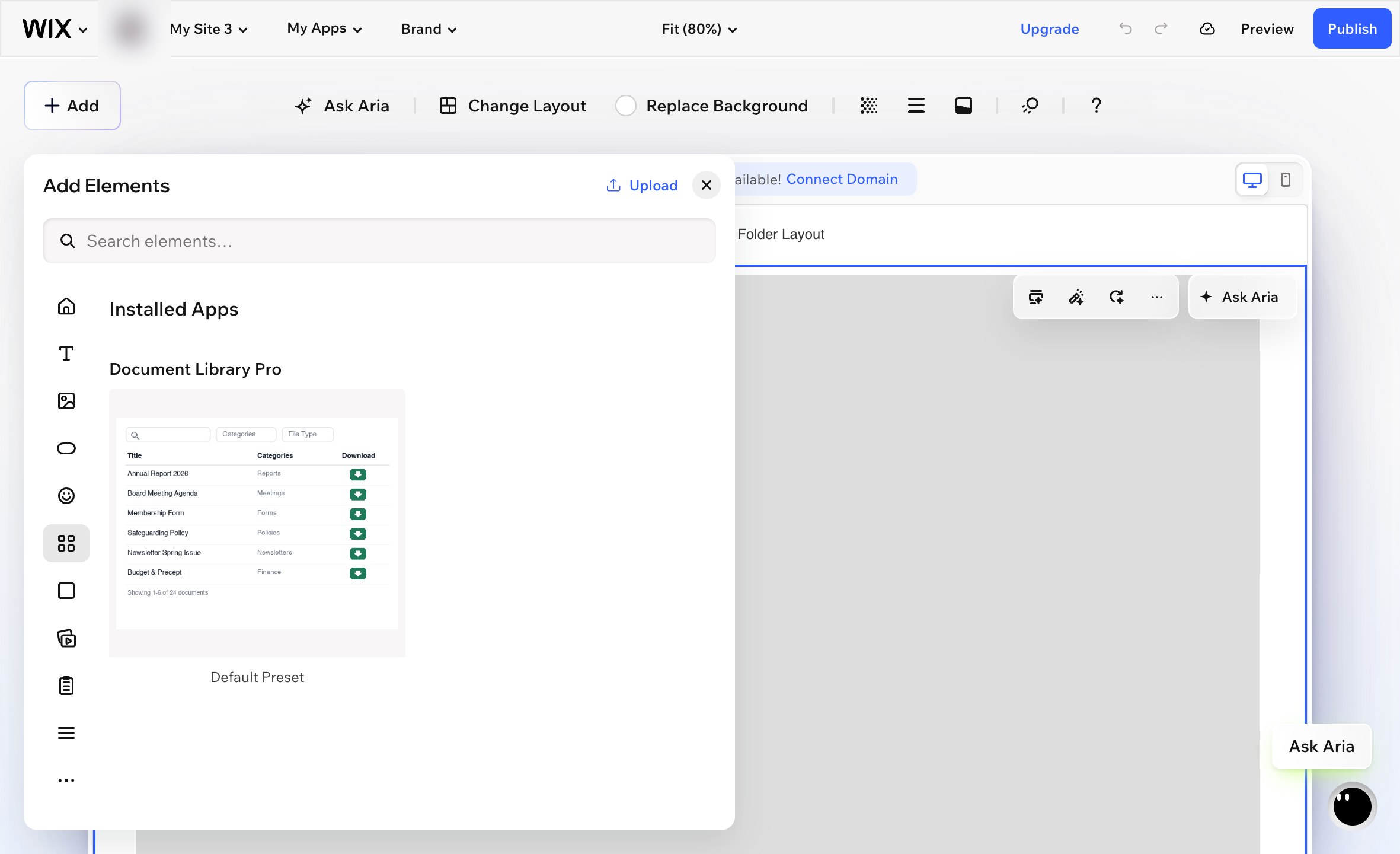
- Vai a Aggiungi → Elementi.
- Scorri fino alla App installate sezione e scegli Document Library Pro. Tieni presente che il widget non apparirà se digiti il suo nome nella Aggiungi casella di ricerca. Devi usare la App installate sezione.
- Wix aggiunge il widget come un piccolo riquadro al centro della pagina. Trascina il widget in posizione e ridimensionalo per riempire l'area in cui vuoi che appaia la libreria di documenti.
- Seleziona il widget e fai clic sull'icona a forma di ingranaggio per aprire le sue impostazioni.
- sotto Library, scegli la libreria di documenti che vuoi visualizzare su questa pagina.
- Pubblica il tuo sito Wix.
La tua pagina Documenti
L'app aggiunge anche una pagina Documents già pronta al tuo sito, che elenca tutti i documenti. Pubblica il tuo sito Wix per renderla live. La pagina è una normale pagina Wix, quindi puoi rinominarla, spostarla nel menu o aggiungere il tuo testo sopra e sotto la libreria.
Dove gestire la tua libreria
I tuoi documenti e le tue librerie si trovano sulla piattaforma Document Library Pro, e l'app li mostra sul tuo sito Wix. Apri Document Library Pro dalla dashboard Wix per andare direttamente al tuo account, dove puoi aggiungere e modificare documenti, creare librerie aggiuntive e cambiare le tue impostazioni.
Se un pagamento non va a buon fine o l'app viene rimossa, la tua libreria viene messa in pausa invece di essere eliminata. Reinstalla l'app o scegli di nuovo un piano, e i tuoi documenti saranno dove li hai lasciati.
Aggiungere la libreria con il codice di incorporamento
Puoi anche aggiungere la tua libreria Document Library Pro a Wix usando il codice di incorporamento universale. È utile se preferisci controllare manualmente l'incorporamento invece di usare l'app Wix.
- Apri la dashboard di Document Library Pro e vai alla Pubblica Libreria sezione della libreria che vuoi visualizzare.
- Copia il codice di incorporamento.
- In Wix, vai a Pagine e menu e crea una nuova pagina vuota.
- Aggiungi un Embed Code elemento. Questo è l'elemento di incorporamento HTML in Wix.
- Incolla il codice di incorporamento di Document Library Pro nell'elemento.
- Ridimensiona l'elemento di incorporamento a larghezza piena e imposta un'altezza adatta. Circa 700 px è un punto di partenza ragionevole. Le librerie più grandi potrebbero richiedere più altezza.
- Pubblica il tuo sito Wix.
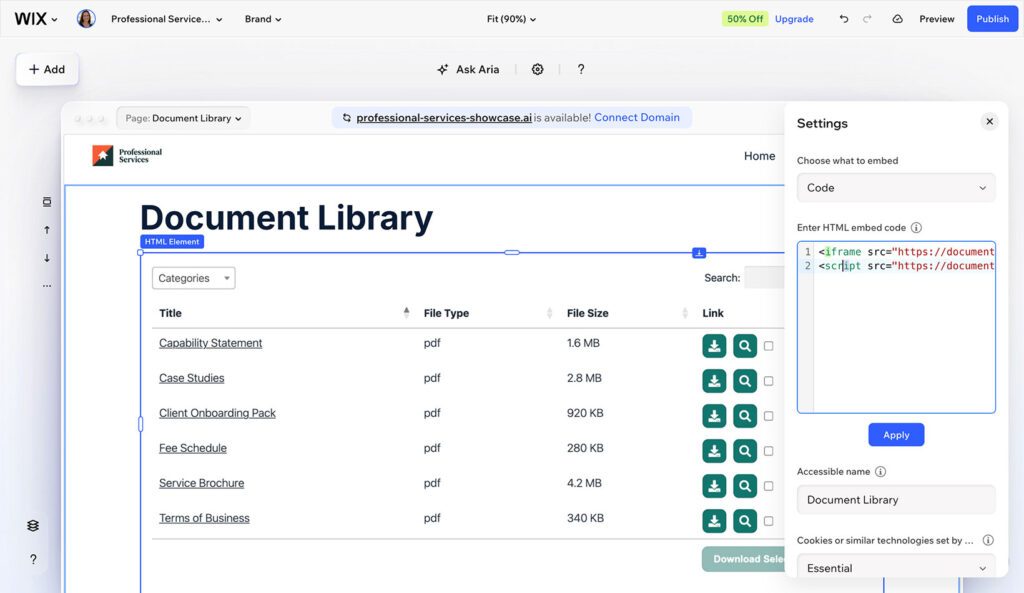
La dimensione dell'elemento di incorporamento è importante. Se l'elemento è troppo piccolo, la libreria potrebbe scorrere all'interno del riquadro di incorporamento o comprimersi in una sola colonna.
Il codice di incorporamento non mostra la libreria di documenti live dentro l'editor Wix. Per vedere la libreria finita, controlla il sito pubblicato.
Passaggi successivi
Se non hai ancora creato la tua libreria di documenti, configurala prima nella dashboard di Document Library Pro. Poi torna a Wix e scegli il metodo con app o il metodo con codice di incorporamento sopra.