





Un elemento Code Embed è il modo per inserire la tua libreria di documenti ospitata su qualsiasi pagina Webflow. I passaggi sotto ti guidano dall'inizio alla fine.
Prima di iniziare: Code Embed è una funzionalità Webflow a pagamento, inclusa nel piano Basic Site plan e superiori. Il piano Starter gratuito blocca il codice personalizzato, quindi è necessario un Site plan a pagamento prima di poter aggiungere e pubblicare l'incorporamento. Tieni presente che la libreria viene renderizzata solo quando la visualizzi in anteprima o la pubblichi. Mentre il Designer è aperto per la modifica, Webflow mostra un segnaposto invece della libreria live.
Passaggio 1: Copia il codice embed
Nel tuo dashboard ospitato, apri Pubblica Libreria per trovare il tuo codice embed, quindi copialo. La maggior parte dei siti ha una singola libreria e la pagina Pubblica libreria è dove si trova il relativo codice embed. (Se hai creato più di una libreria, copia il codice per quella desiderata dalla schermata Libraries .) Incolla sempre il codice esatto dal tuo pannello di controllo, non l’esempio seguente:
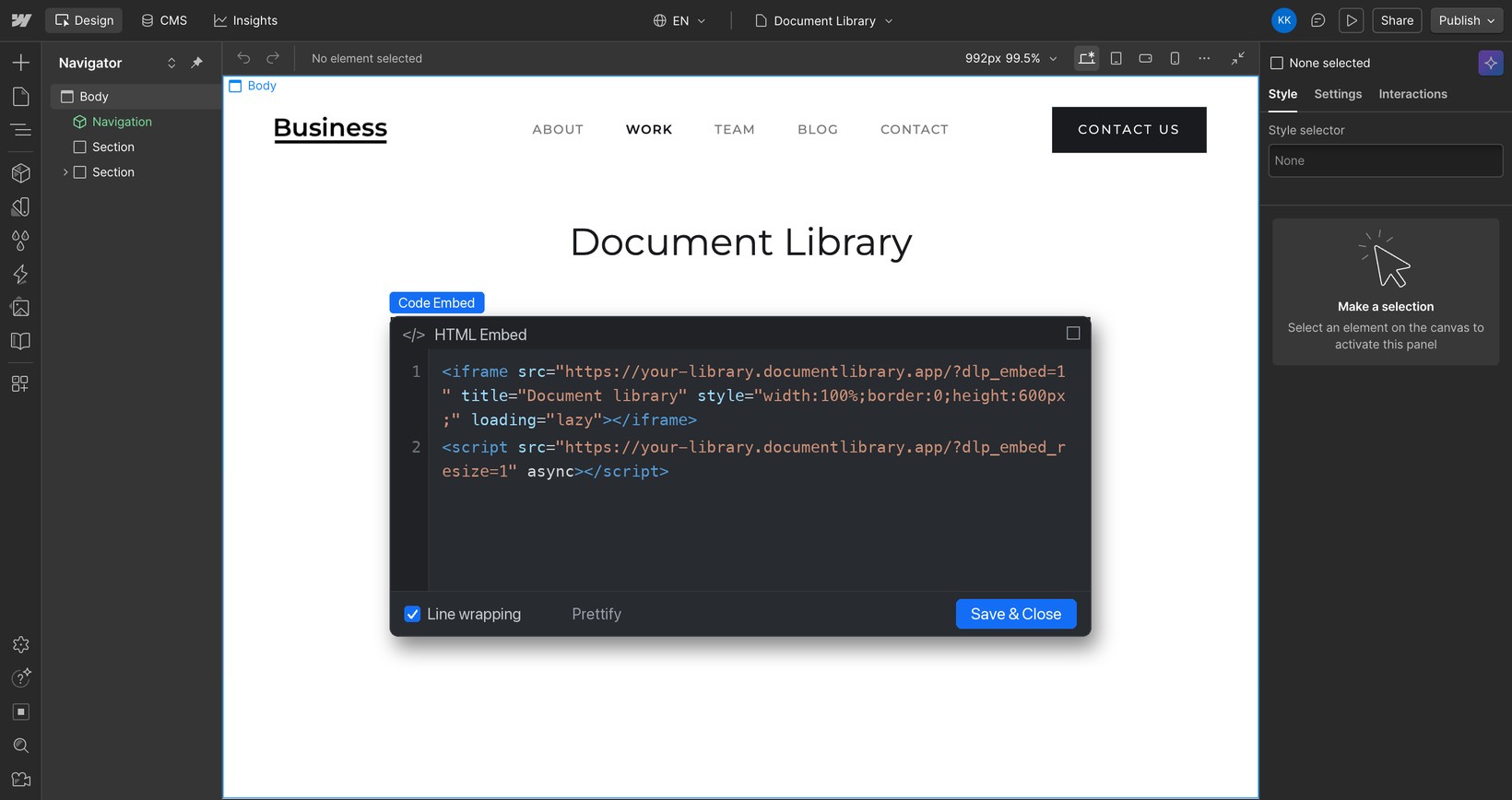
<iframe src="https://your-library.documentlibrary.app/?dlp_embed=1" title="Document library" style="width:100%;border:0;height:600px;" loading="lazy"></iframe>
<script src="https://your-library.documentlibrary.app/?dlp_embed_resize=1" async></script>
Passaggio 2: Crea una pagina per la tua libreria
Nel Webflow Designer, apri il pannello Pagine e fai clic su + per creare una nuova pagina, chiamandola ad esempio libreria di documenti. Affinché i visitatori possano trovarla, aggiungi un link a questa pagina nel menu di navigazione.
Passaggio 3: aggiungi un elemento Code Embed
Con la nuova pagina aperta, fai clic sul pannello + (Aggiungi elementi), cerca Embed, e trascina il Code Embed elemento nella sezione in cui deve stare la libreria.
Passaggio 4: Incolla il codice embed
L'editor del codice appare da solo. Cancella eventuale testo segnaposto, incolla lo snippet del Passaggio 1 e fai clic su Salva & chiudi.
Passaggio 5: Pubblica e visualizza la libreria
Durante la modifica, Webflow mostra un segnaposto dove si trova il Code Embed. Per pubblicare il sito, fai clic su Pubblica in alto a destra, poi apri la pagina per vedere la tua libreria di documenti, dove i visitatori possono cercare, filtrare per categoria e visualizzare in anteprima o scaricare ogni documento. Se vuoi dare un'occhiata prima di pubblicare, fai clic su Anteprima (l'icona a forma di occhio) nel Designer.