





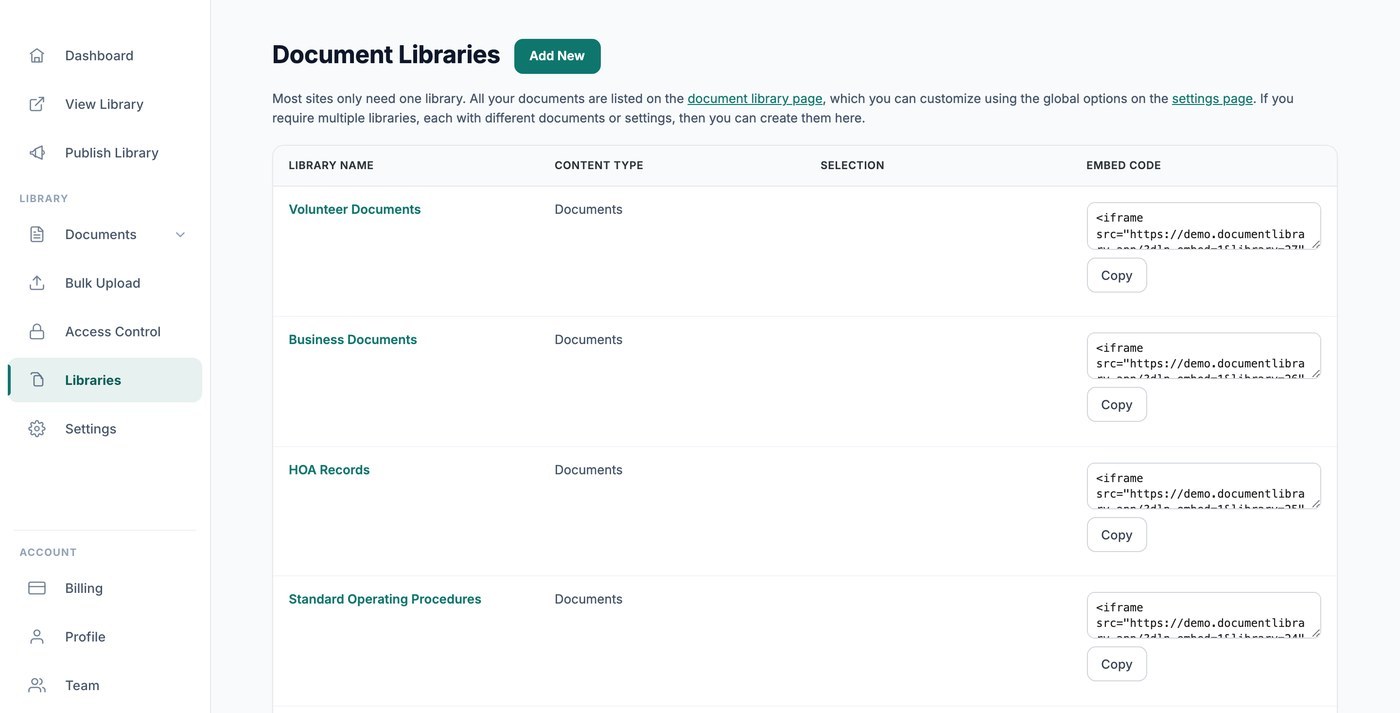
De meeste sites hebben maar één bibliotheek nodig, waarin al je documenten staan en die wordt beheerd door je globale instellingen. Die hoofdbibliotheek wordt gepubliceerd en ingesloten vanaf het Bibliotheek publiceren pagina, en het Bibliotheken scherm is leeg totdat je extra bibliotheken maakt. Als je aparte bibliotheken met verschillende documenten of instellingen nodig hebt, kun je er hier zoveel maken als je wilt.
Wanneer je meerdere bibliotheken gebruikt
Meerdere bibliotheken zijn handig wanneer je verschillende sets documenten op verschillende plekken wilt tonen, bijvoorbeeld een openbare beleidsbibliotheek op de ene pagina en een met wachtwoord beveiligde formulierenbibliotheek op een andere.
Een nieuwe bibliotheek maken
Open het Bibliotheken scherm en klik op Bibliotheek maken. Met een korte wizard kun je de bibliotheek een naam geven, kiezen welke documenten deze bevat (op categorie of tag), en de kolommen, filters, lay-out en sortering instellen.
Een specifieke bibliotheek insluiten
Elke extra bibliotheek die je hier maakt heeft een eigen insluitcode, met een bibliotheekverwijzing zodat de juiste bibliotheek verschijnt. Kopieer deze uit de Insluitcode kolom naast de bibliotheek en voeg deze daarna aan je site toe zoals elke andere insluiting. (De insluitcode van je hoofdbibliotheek staat op de pagina Bibliotheek publiceren, niet hier.)
Elke bibliotheek krijgt een eigen pagina
Elke bibliotheek die je maakt krijgt ook een eigen pagina op het webadres van je bibliotheek, zodat je er direct naar kunt linken of deze kunt insluiten, wat het beste past.
Kiezen welke documenten een bibliotheek toont
Hoe afbakening werkt in de Library Builder
Wanneer je een bibliotheek maakt of bewerkt vanuit het scherm Bibliotheken, begeleidt de Library Builder je bij het kiezen van de documenten die erin horen. Je kunt een bibliotheek helemaal open laten zodat deze alles toont wat je hebt geüpload, of deze beperken tot specifieke categorieën en tags. Elke bibliotheek die je bouwt krijgt een eigen insluiting en een eigen pagina op je gehoste site, zodat je meerdere gerichte bibliotheken naast elkaar kunt publiceren, elk afgebakend tot andere content.
Afbakenen op categorie
De meest gebruikte manier om een bibliotheek te beheren is per categorie. Kies in de Library Builder de categorieën die je in de bibliotheek wilt opnemen. Documenten die onder die categorieën zijn geplaatst verschijnen, en al het andere blijft buiten beeld. Dit is handig wanneer je aparte collecties bewaart, zoals “Ontwerp”, “Drukwerk” of “Beleid”, en voor elke collectie een eigen bibliotheek wilt.
Als je meer dan één categorie selecteert, toont de bibliotheek documenten die bij een van de gekozen categorieën horen.
Afbakenen op tag
Je kunt een bibliotheek ook verfijnen op tag. Tags werken naast categorieën, zodat je een bibliotheek kunt maken die alles ophaalt met een bepaalde tag, ongeacht in welke categorie het staat. Kies de gewenste tags in de Builder en de bibliotheek toont de overeenkomende documenten.
Categorieën en tags combineren
Categorieën en tags kunnen samen worden gebruikt om een bibliotheek nauwkeurig af te stemmen. Je kunt bijvoorbeeld een bibliotheek afbakenen tot een categorie “Rapporten” en deze daarna verder beperken tot documenten met de tag “2025”, zodat de bibliotheek alleen de rapporten van dat jaar toont. Pas de selecties in de Builder aan totdat het voorbeeld de documenten toont die je verwacht.
Content in mappen scheiden
Als je liever alles op één plek houdt maar bezoekers toch wilt laten doorklikken, kun je een bibliotheek overschakelen naar mapweergave bij de stap Lay-out van de Bibliotheekbouwer. Mappen groeperen documenten op categorie en subcategorie, zodat mensen één map tegelijk kunnen openen in plaats van door één lange lijst te scrollen. Dit is een goed alternatief voor het bouwen van meerdere afzonderlijke bibliotheken wanneer alle inhoud bij elkaar hoort.
Meerdere gerichte bibliotheken bouwen
Omdat elke bibliotheek onafhankelijk is, is de eenvoudigste manier om verschillende sets documenten op verschillende plekken te tonen het bouwen van een aparte bibliotheek voor elke set en deze overeenkomstig af te bakenen. Elke bibliotheek die je maakt vanuit het scherm Bibliotheken produceert een eigen insluitcode en een eigen pagina, zodat je elke bibliotheek kunt plaatsen waar je deze nodig hebt en erop kunt vertrouwen dat deze alleen de documenten toont die je koos toen je deze bouwde.