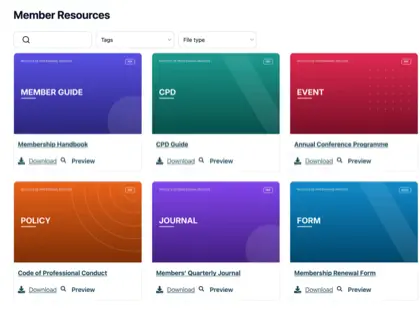
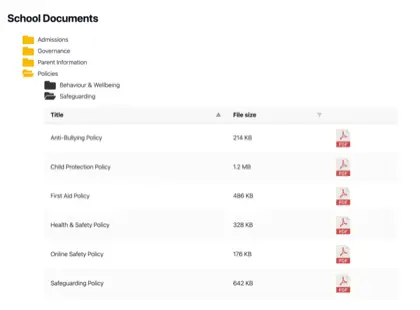
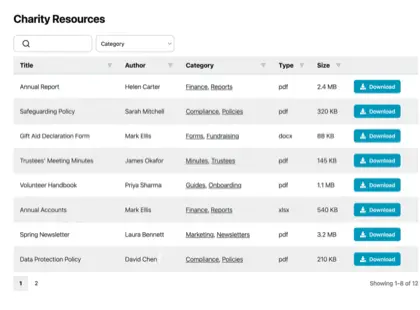
Most small businesses don’t need enterprise document management software to keep their files organized and easy to share. What works better is a simple, searchable document library, set up on the site you already run, where customers and staff can find and download the files they need.
An online document library saves you the daily back-and-forth of emailing attachments and answering the same “where do I find that?” questions every week.
Document Library Pro is what I’d recommend for most small businesses, and the rest of this guide explains why and how to set it up. I’ll cover what document management really involves at this size, why enterprise software is usually overkill, and how to separate the files you share with customers from the ones that need to stay internal.
What small businesses really need from document management
Document management for a small business means storing, organizing, finding and sharing the files your work depends on. That covers everything from price lists, quotes and contracts to product guides, policies, forms and brochures.
Most small teams handle documents in an ad hoc way at first. Files live on someone’s laptop, in a shared cloud folder and as attachments scattered across email, and finding the current version means asking a colleague or scrolling back through a thread. That works for a while, then it quietly starts costing you time as the number of documents grows.
The usual fix is to share a Google Drive or Dropbox link. That’s fine for sending one file to one person, but it falls down when customers need to find documents themselves. Those tools don’t give visitors a searchable list on your own site, so you end up sending a separate link for every file.
What you really need is one searchable place where the right document is a quick search or filter away. For anything more than a handful of files, that means a proper searchable document library rather than a static list of links.
A library lets people search, filter by category and open each file directly. It also keeps every document at a stable web address, so links don’t break when you reorganize.
From looking at how more than 500 organizations use Document Library Pro, PDFs are by far the most common file type, and a simple table layout is the most popular way to display them. Small businesses are no different. Most of what you share is a PDF that someone needs to find and download, so the bar is lower than enterprise vendors suggest.
Why enterprise DMS is overkill for most small businesses
Full enterprise document management systems are built for large teams with heavy compliance needs. They bundle in approval workflows, detailed audit trails, check-in and check-out controls and granular permissions, and they expect dedicated staff to set them up and run them.
For a small business, software that suits a 500-person company is the wrong starting point. It’s expensive, it takes weeks to roll out, and most of the features sit unused. You end up paying for complexity that solves problems you don’t have, while the simple job of publishing a price list or sharing a form with a client stays just as awkward as before.
If you do want to compare the heavier options, I’ve looked at the main ones in my guide to enterprise document management software. For most small businesses, the answer is simpler: Start with a searchable library like Document Library Pro an pay a fraction of the cost of an enterprise solution.
Client-facing vs internal documents
Before you set anything up, it helps to separate your documents into two groups, because they have different needs.
- Client-facing documents are the ones you want customers to find and download, such as price lists, product guides, brochures, spec sheets, application forms and warranty information.
- Internal documents are for your team only, such as contracts, supplier agreements, HR paperwork and financial records.
Client-facing files belong in a public library on your website, where anyone can search and download them without contacting you first. Internal files belong somewhere restricted, either behind a login or on an area of your site only staff can reach.
A product documentation library is a common client-facing example for product-based businesses. A company publishes its manuals, spec sheets and equipment guides, grouped into folders by product line and year. Customers and dealers can then find the right document themselves instead of emailing to ask for it. This is one of the most frequent ways businesses set up Document Library Pro.
For your internal documents, you can either use Document Library Pro to store the files on your website and display them in a password protected library. Alternatively, if you’re using Google for other parts of your business anyway (document creation, Google Workspace, etc.) then that’s perfect for internal document storage. At Barn2, we use Document Library Pro to share documents publicly; and have a shared Google Drive for sharing internal documents within the team.
Setting up a library on your existing site
The simplest way to manage and share documents as a small business is to publish them as a searchable library on the website you already have. Document Library Pro is built for exactly this.
It turns a set of files into a searchable, filterable library. Visitors can search by keyword, filter by category, preview a document in the browser without downloading, download what they need, or select several files to download together as a single ZIP.
It works as a WordPress plugin for businesses whose site runs on WordPress. We also offer a hosted version which can be embedded into any other platform, including Shopify, Squarespace, Wix, Webflow, a custom-built site, Salesforce or an internal intranet. So whatever your small business site is built on, the library lives on it rather than sending customers off to a separate system they have to log into.
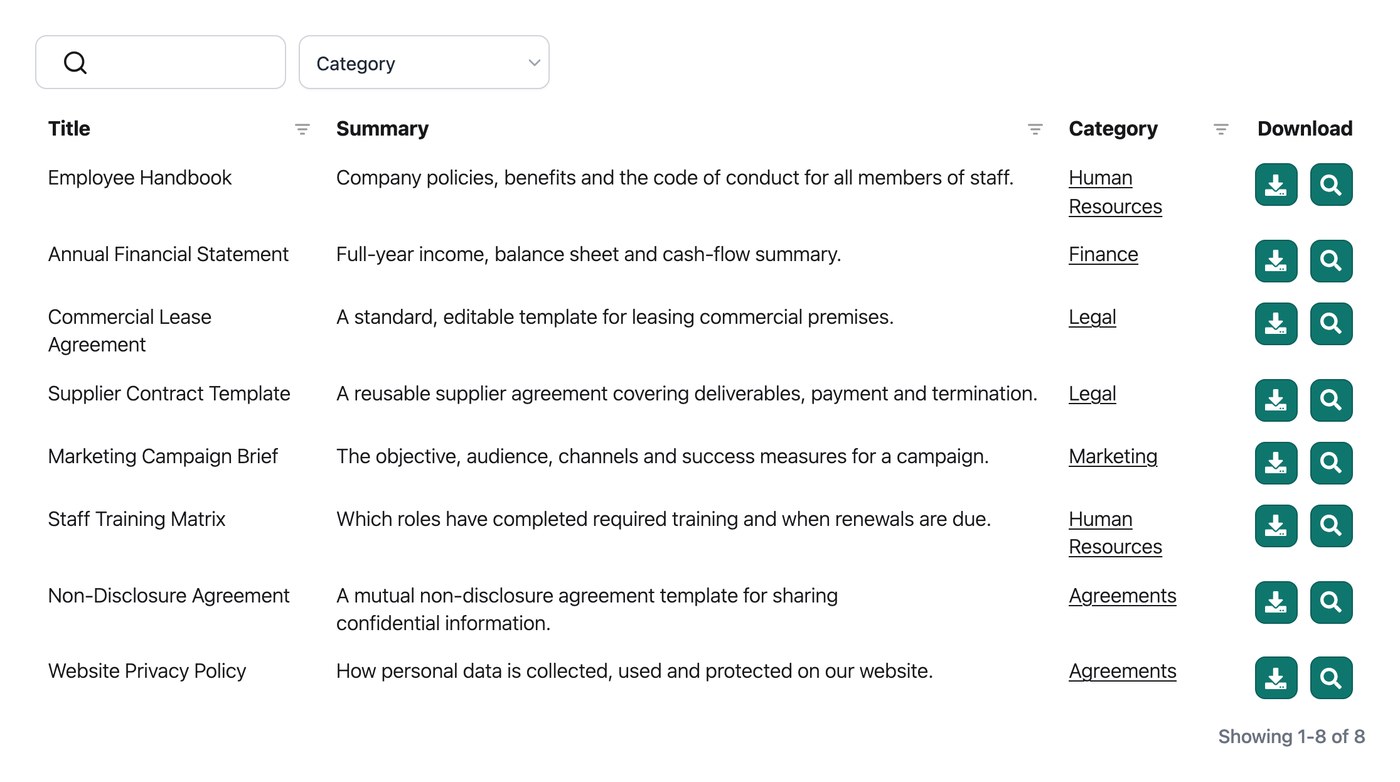
Setting up a small business document library is straightforward. Start by gathering the files you want to share and giving them clear, consistent names so they’re easy to tell apart.
It’s worth taking a little time to organize your files into a few sensible categories first, because those categories become the filters customers use to narrow the library down. Then upload the documents, group them under your categories, and publish the library on the relevant page of your site.
Each document can show its own details in the table, such as a download button, a preview button, the file type and the date. Customers get a tidy, professional way to find what they need, and you get a single place to keep it current.
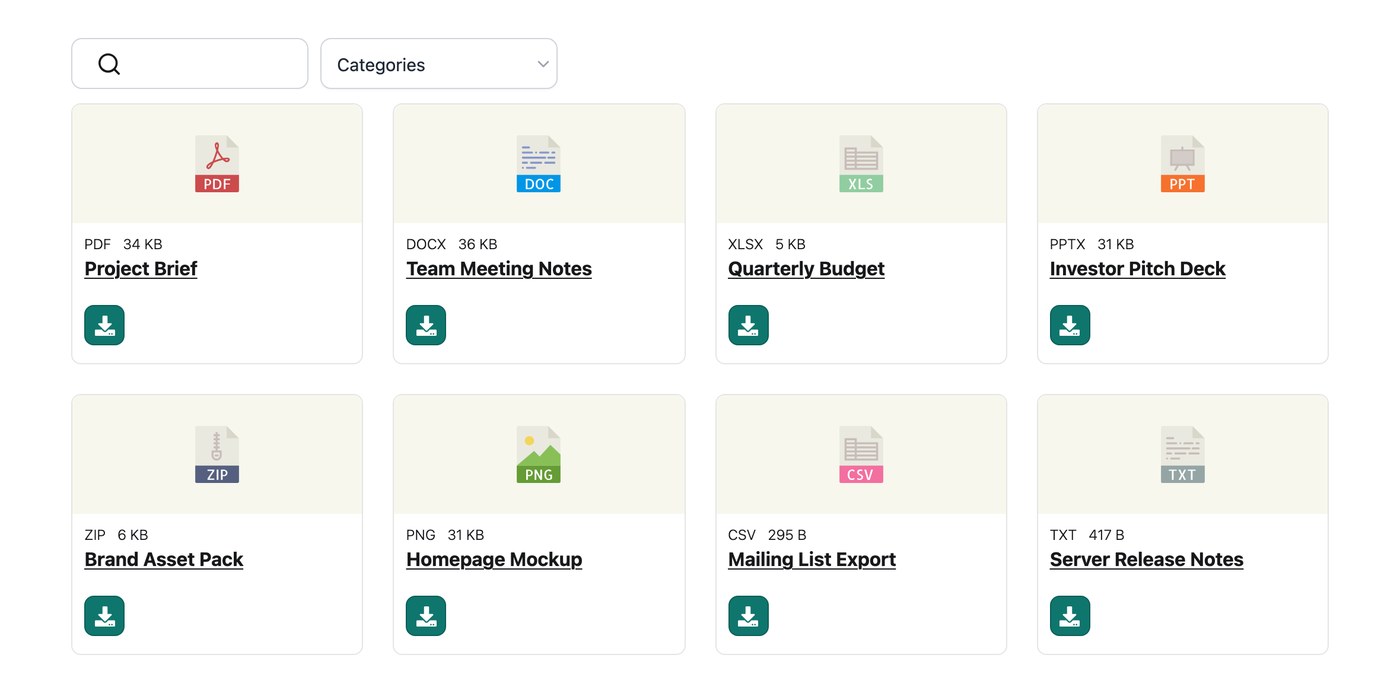
This also fits neatly into a wider move toward going paperless. Once your forms, guides and price lists live in a library customers can reach themselves, there’s far less reason to print or post anything.
How to choose the right approach
The right approach comes down to how many documents you’re dealing with and what you do with them:
- A handful of files, shared occasionally. If you only ever send a few documents to specific people, you don’t need a library at all. Email them or share a direct link and move on.
- A growing set of documents customers need to find. Once you’re regularly publishing or sharing files that people should be able to locate themselves, a searchable library on your site is the right fit. This is where most small businesses land.
- Heavy internal workflows and compliance. If your business genuinely needs approval chains, detailed audit trails and formal records management, that’s where a full document management system earns its cost.
I built Document Library Pro for the middle case, which is where most small businesses sit. It grew out of businesses who were already listing documents on their sites and kept asking for proper download buttons, previews and search. This means that it’s designed around the everyday job of publishing and sharing files, not running a corporate compliance department.
In a nutshell - If your documents are mostly PDFs that customers or staff need to find and download, this is the simplest thing that works. You can have it running on your existing site within an hour.
If you genuinely need approval chains, audit trails and formal records management, I’d point you to a full document management system instead, because that isn’t what Document Library Pro is built for. Document Library Pro does have built-in version control, but it’s designed to be a simple solution for small businesses and is more about sharing and displaying documents.
Frequently asked questions about document management for small businesses
What is the best document management software for a small business?
For most small businesses, the best option is a searchable document library published on your own website rather than a full enterprise system. It gives customers and staff a clear way to find and download the files they need, without the cost, setup time and unused features of software built for large organizations.
Do small businesses need document management software?
Once you’re sharing more than a handful of documents, yes, though probably not the kind enterprise vendors sell. A simple, searchable library does the job for most small businesses. You only need a heavier system if you have formal compliance, approval and audit requirements, which most small teams don’t.
How do I share documents with clients without emailing them?
Publish them in a document library on your website so clients can find and download what they need themselves. They search or filter to the right file and open it directly, which saves you digging out attachments and re-sending them, and means clients always get the current version.
Can Document Library Pro be used by a small business on any website?
Yes. Document Library Pro is available as a WordPress plugin and can also be embedded into other platforms, including Shopify, Squarespace, Wix, Webflow, a custom site or an internal intranet. It publishes your files as a searchable, filterable library that you can keep fully public or restrict to specific people, so it fits whether your business runs on WordPress or something else.
Give your small business one searchable home for its files
Better document management for a small business is simpler than the enterprise market makes it sound. It comes down to giving the price lists, guides, forms and contracts you already produce one searchable home, with the customer-facing files open and the sensitive ones kept behind a login.
Get that in place and you spend less time hunting for files and re-sending attachments, and more time running the business. When you’re ready to set one up, you can try Document Library Pro free for 14 days and build a library your customers and team can rely on.