Document management for schools and universities means keeping policies, forms, prospectuses and board papers which need to be shared publicly in one organized, searchable place. It’s the alternative to scattering those files across web pages, a shared drive and the occasional filing cabinet.
Most schools and universities don’t need heavyweight enterprise software for their document management. Instead, what they usually need is a searchable library published on their existing school/university website, with the right documents visible to the right people.
Education is unusual in how many separate audiences one institution serves. A prospective family, an enrolled parent, a current student, a staff member and a governor all need different documents, and some of those documents are public while others must stay private. That mix makes document management harder for a school or university than for a typical small organization.
We built Document Library Pro to help organizations exactly like education. Nonprofits, health organizations, councils and educational institutions all need to publish a steady flow of documents for several different audiences, and often lack a tidy place to put them.
My recommendation for almost any school or university is a searchable document library on the site you already have, and I’ll explain how that works with Document Library Pro. I’ll cover the documents these institutions juggle, how to split public materials from parent and staff-only ones, how to share board papers safely, and how to build it all on your existing website.
The documents schools and universities juggle
Schools and universities produce a constant stream of documents, which pile up faster than almost anyone expects. A single school carries dozens of policies, term dates and newsletters before you even count the admissions paperwork.
The usual mix includes a few recognizable groups:
- Policies and statutory documents. Safeguarding, behavior, admissions, SEND and privacy policies, many of which schools are legally required to publish.
- Prospective-family materials. Prospectuses, open-day information, admissions forms and term dates that anyone should be able to find.
- Parent and student resources. These include newsletters, homework and reading lists, consent forms, exam timetables and curriculum guides.
- Staff and governor papers. Handbooks, meeting agendas, minutes and draft policies that stay internal.
Universities add even more documents on top. Research publications, department handbooks, course reading lists and conference papers can run to thousands of files across dozens of departments, each with its own way of naming and storing things.
The sheer volume of documents turns this into a real problem. A handful of files is fine as a list of links, but once you’re into the hundreds, people can’t find anything without search and structure. The fix is the same one you’d apply when organizing documents on any drive: agree a clear set of categories first, then put the files somewhere people can search them.
Public, parent and staff-only materials
Education is one of the few sectors where the same institution publishes to three very different audiences at once. Getting document management right means matching each group to what it should see:
- Public. Prospectuses, statutory policies, term dates and admissions information. These should be easy for anyone to find, including prospective families who aren’t logged in.
- Parents and students. Newsletters, forms, reading lists and curriculum resources. Many institutions keep these in a parent and student resource library that’s open to the school community but not the whole web.
- Staff and governors. Handbooks, board papers and internal policies that should never be public.
Schools and universities often make two opposite mistakes here. Some dump everything on one public page, including documents that should be restricted. Others lock all their documents behind a login, so a prospective parent can’t even read the admissions policy without an account. What you want is a single system that can keep the public materials open while gating the rest by group.
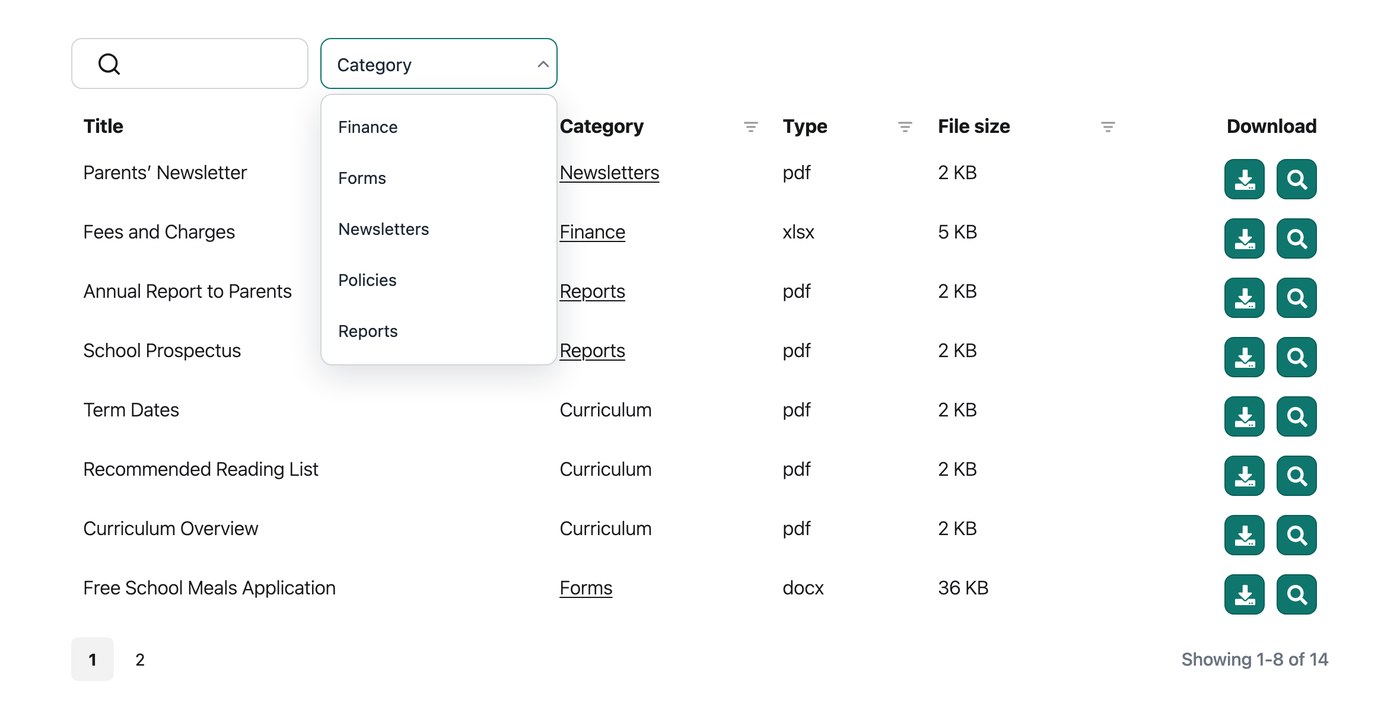
Within each group, institutions need a way for people to quickly access only the documents they need. For the public and parent-facing groups, categories and filters are a good way to do this. For example, a parent can filter to their child’s year group or to “Forms,” and a prospective family can jump straight to admissions, without scrolling past everything else the school has ever published.
Sharing board and governor documents safely
Board and governor documents are the most sensitive set that a school or university handles. Draft policies, financial reports and the minutes of confidential items all need to reach the right people without ever becoming public.
Document Library Pro handles this with built-in access control. You can restrict a whole library, a category or an individual document to specific users, roles or a password, while keeping the public records open to everyone. For a governing body, that effectively gives you a private portal for board documents sitting alongside the school’s public library.
For genuinely confidential governor papers, an even safer approach is to place the restricted library inside a part of the site that already requires a login, such as a staff intranet or members area. The file is then protected by that login, rather than only hidden from the library’s search.
For most institutions, the practical split is straightforward. Keep the public and parent libraries on the open website, and run the governor library inside whatever members area or intranet the staff already log in to.
Building the library on your existing site
A searchable document library turns a long page of links into something parents, students and staff can use. Instead of scrolling, a visitor types a keyword or filters by category, such as year group or document type, and lands on the exact file they came for. That’s the job we built Document Library Pro to do.
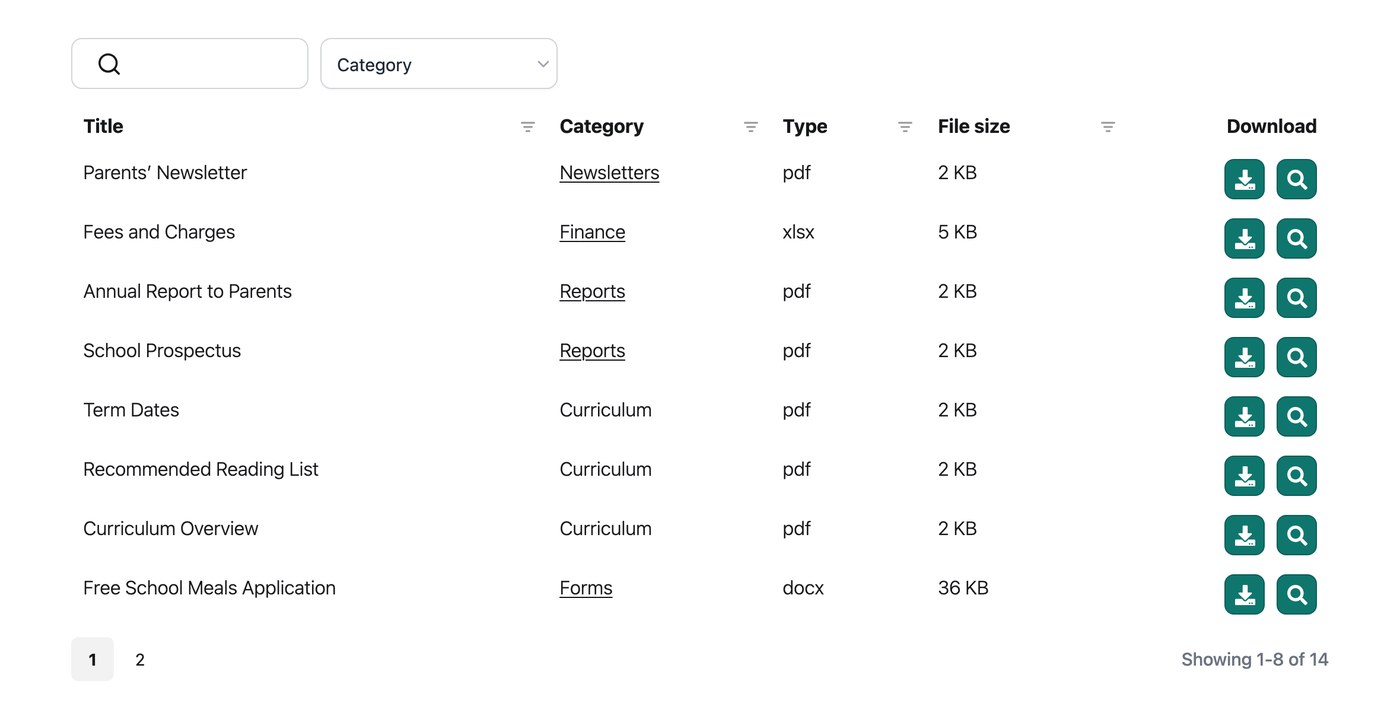
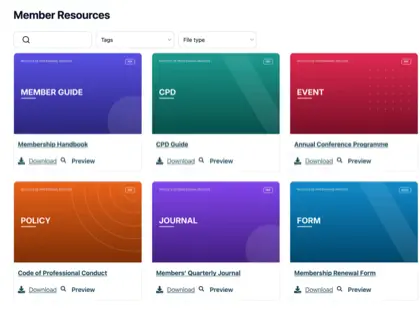
Document Library Pro takes the files that a school or university already produces and publishes them as a structured, searchable document library. Visitors can search by keyword and filter by category, such as department or year. They can preview a document in the browser without downloading it, download what they need, or select several files and download them together as a single ZIP.
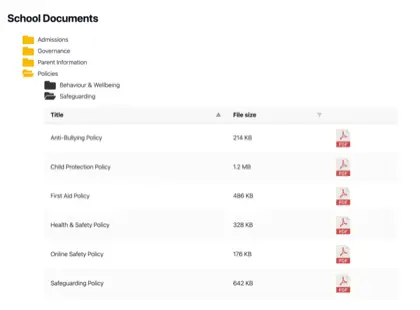
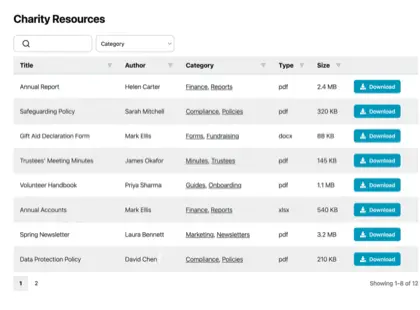
You can present the library as a table, a grid or a folder view, depending on what suits the content. From our analysis of sites running the software, PDFs are by far the most common file type, and the table layout is the most popular choice.
Personally, I’d recommend the table layout for almost any school or university library. It’s the format I find easiest to scan and search across a long run of policies or meeting minutes, which is exactly what education-related libraries tend to be full of.
Document Library Pro runs on whatever platform your institution’s website uses. We originally built it as a WordPress plugin, and it’s still available that way. However, it now also works as a hosted library you can embed into any other platform. A school or university on Squarespace, Wix, Webflow, a custom-built site or an internal intranet can publish the same searchable library without moving to a new system.
Pro tip: If you’re starting from years of existing policies, newsletters and minutes, add them in batches rather than importing the whole back catalog at once. A single very large import can be slow. Once the old documents are in, keeping up with each new term is the easy part.
For real examples of how schools, colleges and universities set this up, take a look at our schools and education page. Whichever route you take, document management for schools comes down to giving every audience a clear way to find what it needs.
Keeping the library current
Publishing the documents is only half the job. A library only stays useful if it’s current, and it loses parents’ trust fast when last year’s term dates are still at the top or a withdrawn policy is the first result.
Two simple habits keep it reliable:
- Agree how long each type of document stays available and when it gets archived or replaced. This is really just a retention policy applied to what you publish. In England, for example, the Department for Education sets out what maintained schools must publish online, a useful starting point for deciding what to keep visible.
- Give one person clear responsibility for the library, even when others can upload to it, so a new newsletter or policy goes up on schedule and nothing falls between roles.
Larger institutions often want departments or committees to keep their own sections current. A front-end submission form lets staff add documents themselves, optionally held for approval before they appear, so a central web team isn’t the bottleneck for every new file.
One thing we’ve learned from organizations running submission-based board libraries is worth passing on: if you have a long list of categories, the submission form currently shows them all in a single alphabetical dropdown. It pays to keep your category list manageable, or group uploads under a smaller set of top-level categories, so the people submitting documents aren’t scrolling a huge menu.
Document Library Pro also includes built-in version control. Turn it on to keep a record of each document’s history and make sure it’s always clear which version is the current one, which matters for policies that get revised every year.
Frequently asked questions about document management for schools
What is the best way for a school to share documents online?
For anything more than a handful of files, the best approach is a searchable document library on the school’s own website, rather than a long page of links or a shared cloud folder.
A library lets parents and students search and filter to the document they need, keeps each file at a stable address, and lets you keep public materials open while restricting staff and governor papers.
How can a university manage large research and document libraries?
Use categories and filters to break a large collection down by department, year or document type, and present it as a table so visitors can scan and sort thousands of records. Visitors can search by title, author and keyword, and full-text search inside PDFs works today.
A front-end submission form also lets each department keep its own section up to date without routing everything through a central team.
Can a school keep some documents private to staff or governors?
Yes. Use access control to restrict a library, or individual documents, to specific users, roles or a password, while keeping the public records open to everyone. For genuinely sensitive files such as board papers, place the restricted library inside a part of the site that already requires a login. The file itself is then protected, rather than only hidden from the library’s search.
Does Document Library Pro work if our school site isn’t on WordPress?
Yes. Document Library Pro works as a WordPress plugin and can also be embedded into other platforms, including Squarespace, Wix, Webflow, a custom site or an internal intranet. It publishes your files as a searchable, filterable library that you can keep fully public or restrict to specific people, so it fits whether your institution’s site runs on WordPress or something else.
Give your school’s documents a searchable home
For most schools and universities, good document management comes down to one thing. Give the policies, forms, newsletters and board papers you already produce a single searchable home on your own website, with the public materials open and the sensitive files behind a login.
Get that in place and you spend less time answering “where do I find” emails and rebuilding broken links, and more time on teaching and running the institution.
When you’re ready to set one up, try Document Library Pro free for 14 days and give your parents, students and staff a library they can rely on.