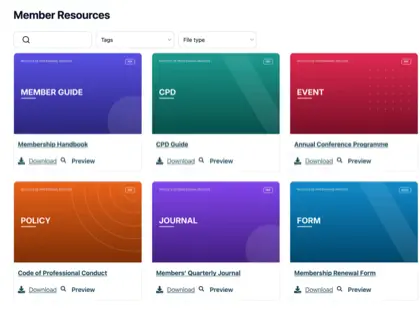
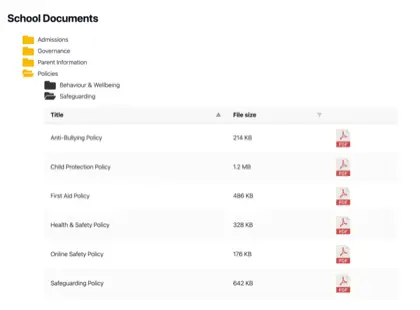
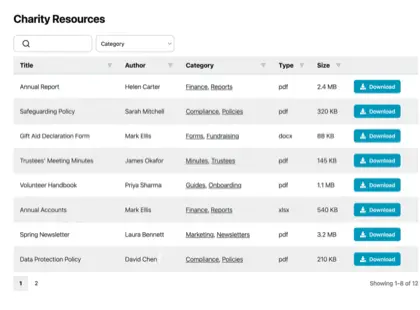
Add a document library to any other platform
Build your library once, then add a simple embed code to any other website, CMS, intranet or custom-built site to display a searchable, filterable document library.
Works wherever you can paste HTML
One embed code, any technology
If your platform lets you add an embed or a snippet of HTML, it can show your document library. That covers almost everything.
Other CMSs
Drupal, Joomla, Ghost, HubSpot and any other content platform that allows embeds.
Static HTML sites
Hand-coded or generated sites - paste the snippet straight into your HTML.
Private intranets
Internal portals and staff intranets where teams need quick access to documents.
Custom-built sites
React, Vue, or server-rendered apps - the embed drops in like any other component.
How it works
A document library on any site, in three steps
Build your library in the hosted dashboard, then add the embed code wherever your site accepts HTML.
Build your library
Create your library in the hosted dashboard. Upload your documents and sort them into categories. You can also sync a Google Drive or Dropbox folder, so your documents create themselves.
Copy your embed code
Copy the embed code shown next to your library in the dashboard.
Add it to your site
Paste the embed code into any HTML, embed or code area on your site, then publish. Our step-by-step guide walks you through it.
The embed code
One snippet that works everywhere
Paste this wherever your platform accepts HTML. The library resizes itself where scripts are allowed, and falls back to a fixed height everywhere else.
This is an example. After you create your library, copy your own code from the hosted dashboard - it includes your library’s unique address (its “slug”), shown here as your-library.
Whatever your stack, consider it covered
Share guides, reports, and resources in one searchable library that your visitors can browse and download - on any website.
See it in action
The admin demo shows the WordPress plugin. The hosted version works the same way behind the scenes - just with its own dashboard.