





Il est important de maintenir votre bibliothèque à jour, afin que les visiteurs accèdent toujours à la dernière version de chaque fichier. Lorsqu’un document change dans votre organisation, votre bibliothèque Hosted Document Library Pro permet de le remplacer rapidement par la nouvelle version. Les documents synchronisés depuis un Dossier Google Drive ou Dropbox se mettent à jour automatiquement : il vous suffit de remplacer le fichier dans le dossier, et la modification se synchronise automatiquement.
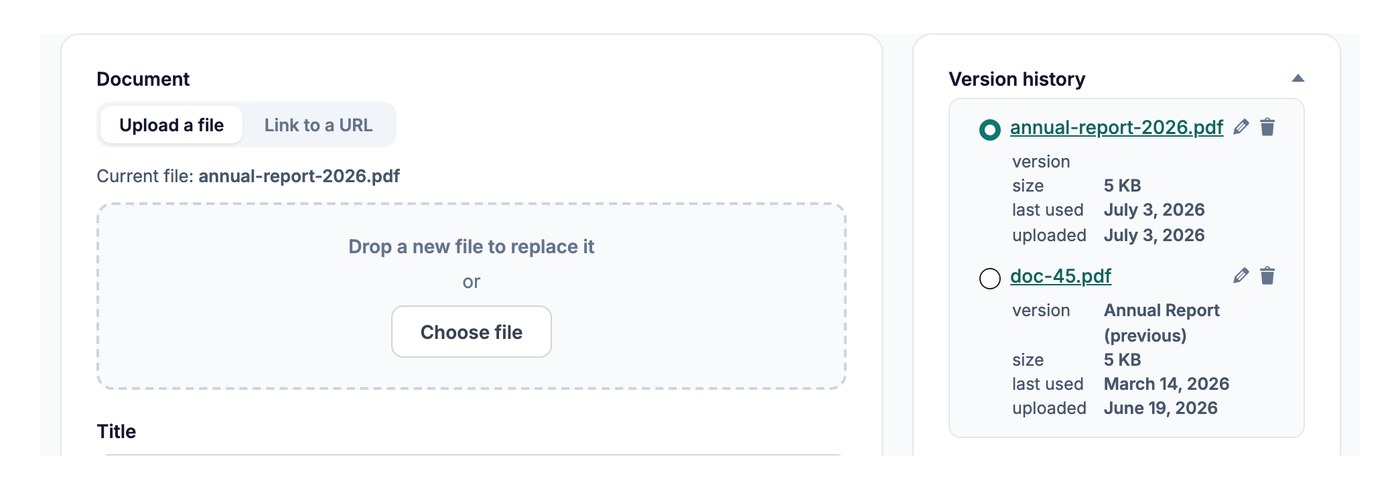
Remplacer le fichier du document
Pour mettre à jour un document, ouvrez-le depuis Documents → Mes documents et remplacez son fichier :
- Ouvrez le document que vous souhaitez mettre à jour depuis votre tableau de bord.
- Cliquez sur Remplacer le fichier et téléversez la nouvelle version, ou collez un nouveau lien si le fichier se trouve ailleurs en ligne.
- Enregistrez le document.
Le lien de téléchargement pointe désormais vers le fichier mis à jour, sans autre modification nécessaire.
Conserver les anciennes versions
Si le contrôle de version est activé et que le remplacement des fichiers est réglé pour conserver l’original, remplacer un fichier conserve l’ancienne version dans l’historique afin que vous puissiez examiner les changements au fil du temps. Le contrôle de version est une Advanced plan .