





Il existe deux façons d’ajouter une bibliothèque Document Library Pro à un site Wix. L’option la plus simple consiste à utiliser Application Document Library Pro pour Wix, qui ajoute la bibliothèque comme widget Wix. Le code d’intégration universel fonctionne toujours si vous préférez ajouter la bibliothèque manuellement. Cet article couvre d’abord la méthode de l’application Wix, puis la méthode du code d’intégration.
Ajouter la bibliothèque avec l’application Wix
- Installez l'application Document Library Pro depuis le Wix App Market. Choisissez une offre pour commencer votre essai gratuit de 14 jours, facturé via Wix. L’application crée votre bibliothèque de documents pour vous.
- Ouvrez l’e-mail de bienvenue et cliquez sur Définir votre mot de passe. C’est ainsi que vous vous connectez pour gérer vos documents.
- Ouvrez la page où vous voulez afficher la bibliothèque dans l’éditeur Wix.
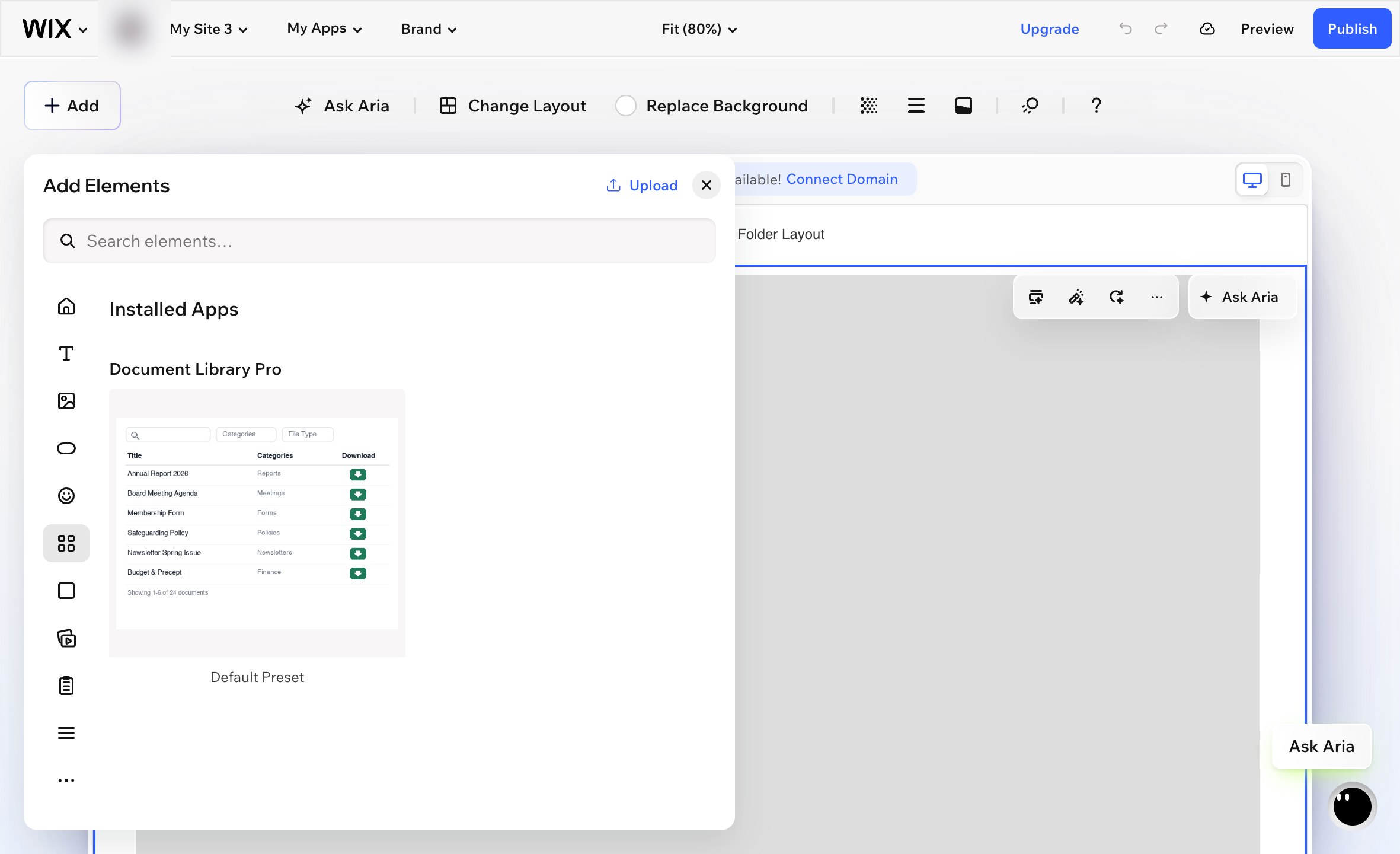
- Aller à Add → Elements.
- Faites défiler jusqu’à Installed Apps section et choisissez Document Library Pro. Veuillez noter que le widget n’apparaîtra pas si vous saisissez son nom dans le Ajouter champ de recherche. Vous devez utiliser la Installed Apps section.
- Wix ajoute le widget sous forme de petite boîte au milieu de la page. Faites glisser le widget en position et redimensionnez-le pour remplir la zone où vous voulez que la bibliothèque de documents apparaisse.
- Sélectionnez le widget et cliquez sur l’icône d’engrenage pour ouvrir ses paramètres.
- sous Library, choisissez la bibliothèque de documents que vous voulez afficher sur cette page.
- Publiez votre site Wix.
Votre page Documents
L’application ajoute également une page prête à l’emploi Documents à votre site, qui liste tous vos documents. Publiez votre site Wix pour la mettre en ligne. La page est une page Wix normale, vous pouvez donc la renommer, la déplacer dans votre menu ou ajouter votre propre texte au-dessus et au-dessous de la bibliothèque.
Où gérer votre bibliothèque
Vos documents et bibliothèques se trouvent sur la plateforme Document Library Pro, et l’application les affiche sur votre site Wix. Ouvrez Document Library Pro depuis votre tableau de bord Wix pour accéder directement à votre compte, où vous pouvez ajouter et modifier des documents, créer des bibliothèques supplémentaires et modifier vos réglages.
Si un paiement échoue ou si l’application est supprimée, votre bibliothèque est mise en pause plutôt que supprimée. Réinstallez l’application ou choisissez à nouveau une offre, et vos documents vous attendent là où vous les avez laissés.
Ajouter la bibliothèque avec le code d’intégration
Vous pouvez aussi ajouter votre bibliothèque Document Library Pro à Wix à l’aide du code d’intégration universel. C’est utile si vous préférez contrôler l’intégration manuellement au lieu d’utiliser l’application Wix.
- Ouvrez votre tableau de bord Document Library Pro et allez à la Publier la bibliothèque section correspondant à la bibliothèque que vous voulez afficher.
- Copiez le code d’intégration.
- Dans Wix, allez à Pages And Menu et créez une nouvelle page vierge.
- Ajouter un Code intégré élément. Il s’agit de l’élément d’intégration HTML dans Wix.
- Collez le code d’intégration Document Library Pro dans l’élément.
- Redimensionnez l’élément d’intégration en pleine largeur et définissez une hauteur appropriée. Environ 700 px est un bon point de départ. Les bibliothèques plus volumineuses peuvent nécessiter plus de hauteur.
- Publiez votre site Wix.
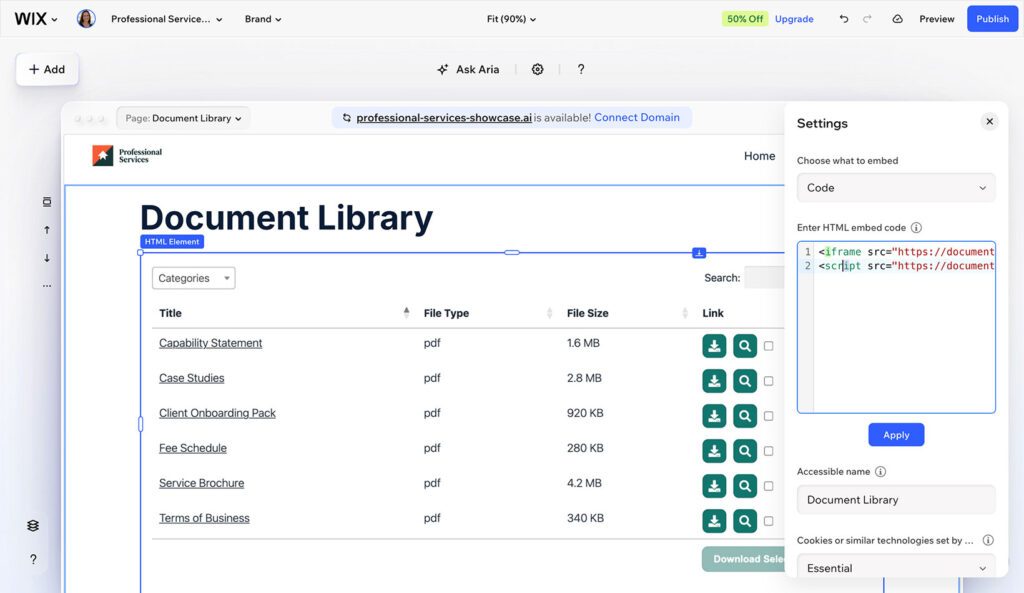
La taille de l’élément d’intégration est importante. Si l’élément est trop petit, la bibliothèque peut défiler dans la zone d’intégration ou se réduire à une seule colonne.
Le code d’intégration n’affiche pas la bibliothèque de documents en direct dans l’éditeur Wix. Pour voir la bibliothèque terminée, consultez votre site publié.
Étapes suivantes
Si vous n’avez pas encore créé votre bibliothèque de documents, configurez-la d’abord dans votre tableau de bord Document Library Pro. Revenez ensuite à Wix et choisissez soit la méthode avec l’application, soit la méthode avec le code d’intégration ci-dessus.