





Document Library Pro puede mostrar una fecha para cada documento de tu biblioteca y te permite controlar el formato de esas fechas. Como la columna de fecha se trata como una fecha y no como texto sin formato, también ordena la columna correctamente por fecha en lugar de alfabéticamente.
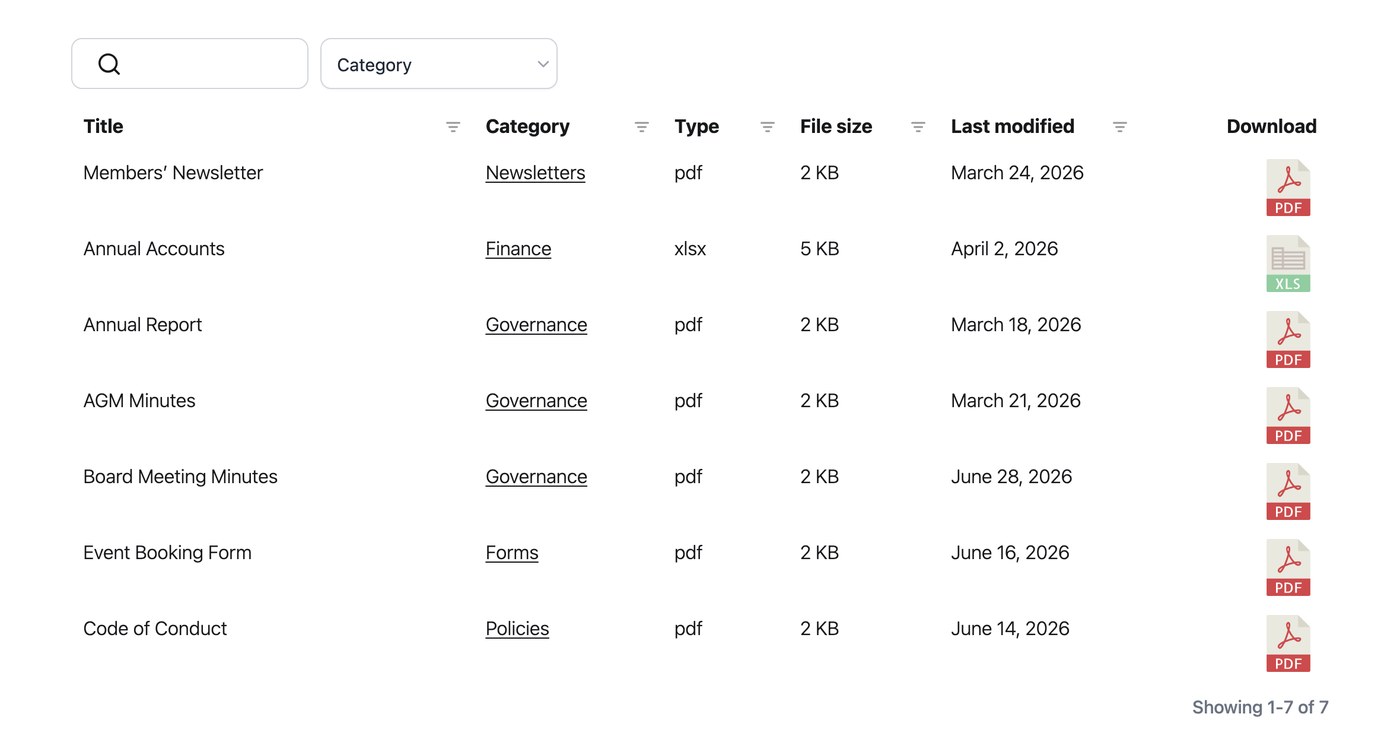
Añadir una columna de fecha
Para mostrar fechas en tu biblioteca, añade la columna de fecha a tu tabla o cuadrícula en la pestaña Visualización de tus ajustes. Una vez añadida la columna, los visitantes pueden ordenar por ella y las fechas aparecen con el formato que hayas elegido.
Formato de fecha
De forma predeterminada, las fechas utilizan el formato establecido en Ajustes → General. Puedes cambiar el formato de fecha por cualquier cadena de formato válida. Por ejemplo, “F j, Y” muestra fechas como “August 24, 2026”. Lo estableces en la pestaña General de tus ajustes y se aplica a la columna de fecha dondequiera que aparezca.