Document management for healthcare means giving patients, staff and the public one reliable place to find the documents your organization shares. That covers patient leaflets, consent forms, clinical guidance, policies and research, but not the protected medical records that belong in your clinical systems.
Most healthcare organizations don’t need new enterprise software for this. The documents people struggle to find are usually the ones you already publish. Think of the fact sheet a patient was told to read, the policy a regulator asked for, or the form a new referral has to complete.
When we looked at 500 organizations using Document Library Pro, health clinics and health organizations were the second-largest group, at roughly 27% of all users. That happened without us targeting the sector, which tells you how many healthcare teams share the same problem: A growing pile of documents and nowhere tidy to put them.
I’ll start with the documents healthcare organizations typically publish, then draw a clear line around what this approach is not for. After that, I’ll look at how to separate patient-facing materials from staff-only ones, and how to build a searchable library on the site you already run.
The documents healthcare organizations publish
Healthcare organizations publish a far wider range of documents than most people expect, and almost none of it is the clinical record itself. Most of it sorts into a few familiar groups:
- Patient and caregiver resources. Condition fact sheets, treatment guides, aftercare instructions, translated leaflets and self-help materials that patients are told to read at home.
- Policies and governance. Privacy notices, safeguarding and complaints policies, board papers, annual reports and quality statements, many of which you’re expected to make available.
- Forms and administrative documents. Patients and partner organizations download and complete registration forms, consent forms, referral paperwork and insurance documents.
- Clinical guidance and research. Clinicians and partner teams refer back to protocols, clinical guidelines, formularies and published studies.
The thread connecting them is that these are long-lived files people return to, not one-off attachments. A consent form or a clinical protocol needs to be findable next week and next year, which means it needs a proper home rather than a link buried somewhere on a web page.
This is not a clinical or EHR records system
This kind of document library is for the materials you publish and share, not for protected health information. It’s not an electronic health record (EHR), a practice management system or a place to keep individual patient files.
In the United States, HIPAA governs how protected health information is stored, transmitted and accessed, and that data belongs in systems built and certified for it. A patient education leaflet, a public privacy notice or a downloadable referral form is different, because it carries no personal health data, so it’s safe to publish openly.
Keeping the two apart is the whole point. Use your clinical systems for records about a named patient, and use a document library for the general resources, policies and forms that any patient, clinician or member of the public might need.
Patient and public resources vs staff-only materials
Once you know which documents you’re sharing, the next decision is who should see each one. Most healthcare organizations are really running two libraries at once.
Public and patient-facing documents do more good the easier they are to reach. Condition guides, aftercare instructions, policies and forms should be open, searchable and a click away, because a resource nobody can find helps nobody. Here, a public patient resource library beats a leaflet buried three clicks deep.
Staff-only materials are different. Internal protocols, draft policies, training packs and committee papers should sit behind a login. The mistake I see most often is treating both the same way, either locking down a leaflet that should be public or leaving an internal document reachable by anyone with the link.
You can run both from one site. Keep a public library for the materials anyone should see, and a restricted library for staff, clinicians or the board. If most of what you share is sensitive and goes to a defined group, it’s worth reading up on how to share documents securely. A private client portal may fit better than a public library.
I’ll be upfront about one limit in Document Library Pro. A password controls who can browse and search a library, but it doesn’t lock the underlying file once someone has the direct link.
For genuinely sensitive staff documents, put the library inside an area of your site that already requires a login, such as a staff intranet, so the files are protected by that login too.
Building a searchable library on your site
You don’t need a separate platform for any of this. The most sustainable approach is to publish a searchable library on the website you already have, so there’s no new system for patients or staff to log into and learn. That’s the gap we built Document Library Pro to fill.
It grew out of repeated requests from people using our table plugin, Posts Table Pro, to list documents on their sites who wanted proper download and preview features. So we built a tool shaped around exactly this job, and over the years health organizations have become one of its biggest groups of users.
In the healthcare libraries we’ve looked at, the content is almost always patient resources, policies and forms in PDF form, shown in a simple searchable table, rather than anything resembling a clinical system.
Document Library Pro turns a folder of files into a searchable document library with real structure. Patients and staff can search by keyword and filter by category such as condition, department or year. They can preview a document in the browser without downloading it, download what they need, or select several files and download them together as a single ZIP.
For a healthcare organization, a few features matter more than the rest:
- Categories and filters. Group documents by condition, department, audience or year so someone finds the right leaflet in seconds rather than scrolling a long page.
- Built-in access control. Make a library public, or restrict it by user, role or password, so your patient resources and your staff protocols can live on the same site under different rules.
- A document submission form. Let staff upload files themselves, optionally held for approval, so the library isn’t bottlenecked through one overworked person.
- Optional email capture. Ask for an email address before certain downloads when a resource is worth it, which can support patient or newsletter sign-ups without bolting on another tool.
Document Library Pro is available for whatever platform your site runs on. It works as a WordPress plugin for sites built on WordPress. It also comes as a hosted version you can embed into any other platform, including Shopify, Squarespace, Wix, Webflow, a custom-built site or an internal intranet.
Either way, the library lives on your own site rather than sending patients off to a separate portal.
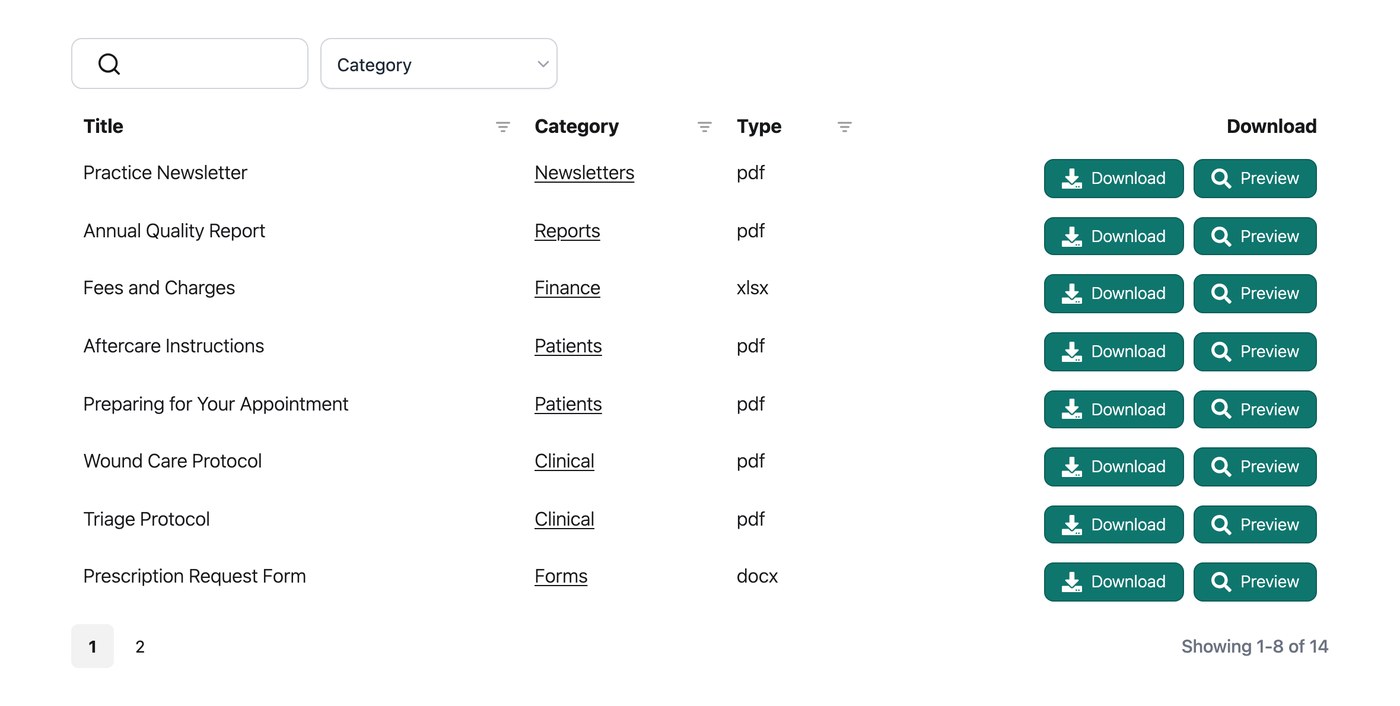
Setting one up is straightforward. Gather the files you want to share, give them clear and consistent names, and spend a little time first to organize them into sensible categories, because those categories become the filters people use. Then upload the documents, group them, and publish the library on the relevant page of your site.
Each document can show its own details in the table, such as a download button, a preview button, the file type and the date it was last updated. Patients get a tidy, professional way to find what they need, and you get a single place to keep everything current.

Healthcare organizations already doing this
Plenty of health organizations already run this exact setup, and you can see their libraries live.
Imerman Angels, a cancer support nonprofit, publishes a searchable resource library for people affected by cancer. They can find guides and support materials themselves, rather than calling or emailing and waiting for a reply.
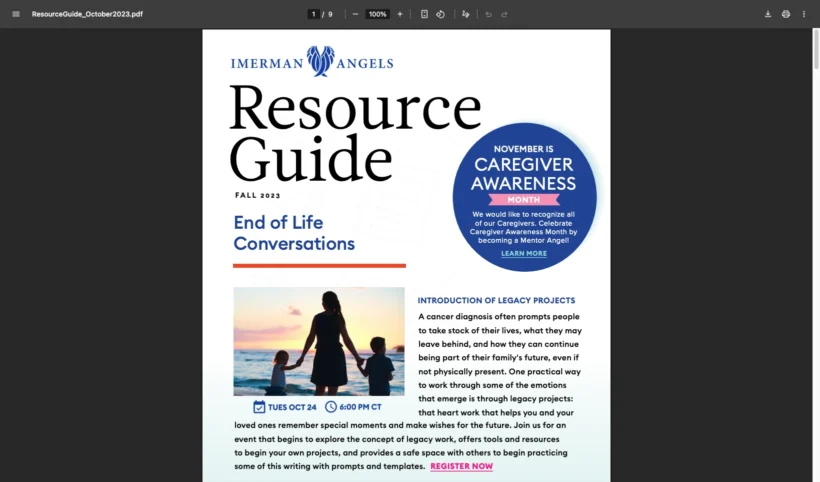
Children’s Mental Health Ontario runs a family resource hub the same way, with filters that let parents and caregivers narrow a large set of mental health resources down to what’s relevant to them.
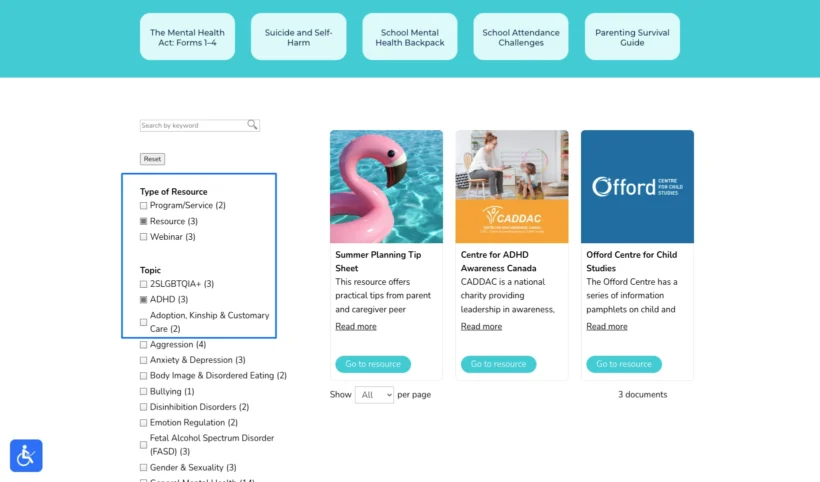
Neither built a custom system or moved to enterprise software. Both use Document Library Pro to run their library on the site they already had, which is the realistic path for almost any healthcare organization. You can see more on our healthcare page.
Frequently asked questions about document management for healthcare
Is a document library the same as an EHR or medical records system?
No. A document library publishes and shares general documents such as patient leaflets, policies and forms. It’s not an electronic health record or a place to store protected health information about named patients, which belongs in systems built and certified for that purpose.
Can healthcare organizations keep some documents private?
Yes. Use access control to restrict a library, or individual documents, to specific users, roles or a password, while keeping patient-facing materials open. For sensitive staff documents, place the restricted library inside a part of your site that already requires a login, so the file itself is protected and not only hidden from search.
What file types can a healthcare document library handle?
Any common file type, though most healthcare documents are PDFs. Across the organizations we looked at, PDFs were by far the most common file, usually shown in a simple, searchable table. You can also include Word documents, spreadsheets, images and more in the same library.
Can Document Library Pro be used on any website?
Yes. It works as a WordPress plugin and can also be embedded into other platforms, including Shopify, Squarespace, Wix, Webflow, a custom site or an internal intranet. It publishes your files as a searchable, filterable library you can keep public or restrict to specific people, so it fits whether your organization runs on WordPress or something else entirely.
Make your health documents easy to find
For most healthcare organizations, better document management has nothing to do with clinical software. It comes down to giving the leaflets, policies and forms you already produce one searchable home on your own site, with patient resources open and staff materials behind a login.
Get that in place and patients stop calling to ask where a form is, and staff stop emailing the same documents around every week.
When you’re ready to set one up, you can try Document Library Pro free for 14 days and give your patients, staff and partners a library they can rely on.