





Keeping your library current matters, so visitors always reach the latest version of each file. When a document changes in your organization, your hosted Document Library Pro library makes it quick to swap in the new version. Documents synced from a Google Drive or Dropbox folder update themselves: Just replace the file in the folder and the change syncs across automatically.
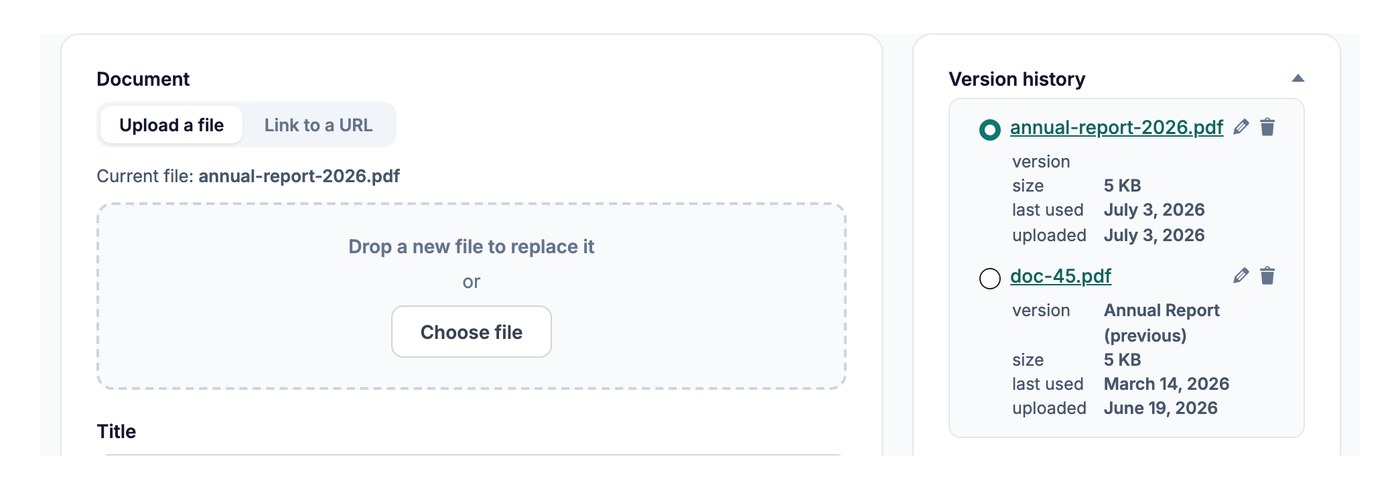
Replace the file on the Add Document screen
To update a document, open it on the Add Document screen and drop the new file in place of the old one:
- Open the document you want to update from your dashboard.
- Remove the current file from the document.
- Upload the new version in its place, or paste a new link if the file lives elsewhere online.
- Save the document.
The download link now points to the updated file, with no other changes needed.
Keeping older versions
If you have version control switched on, replacing a file keeps the earlier version on record rather than discarding it, so you can review what changed over time. Version control is an Advanced plan feature.