





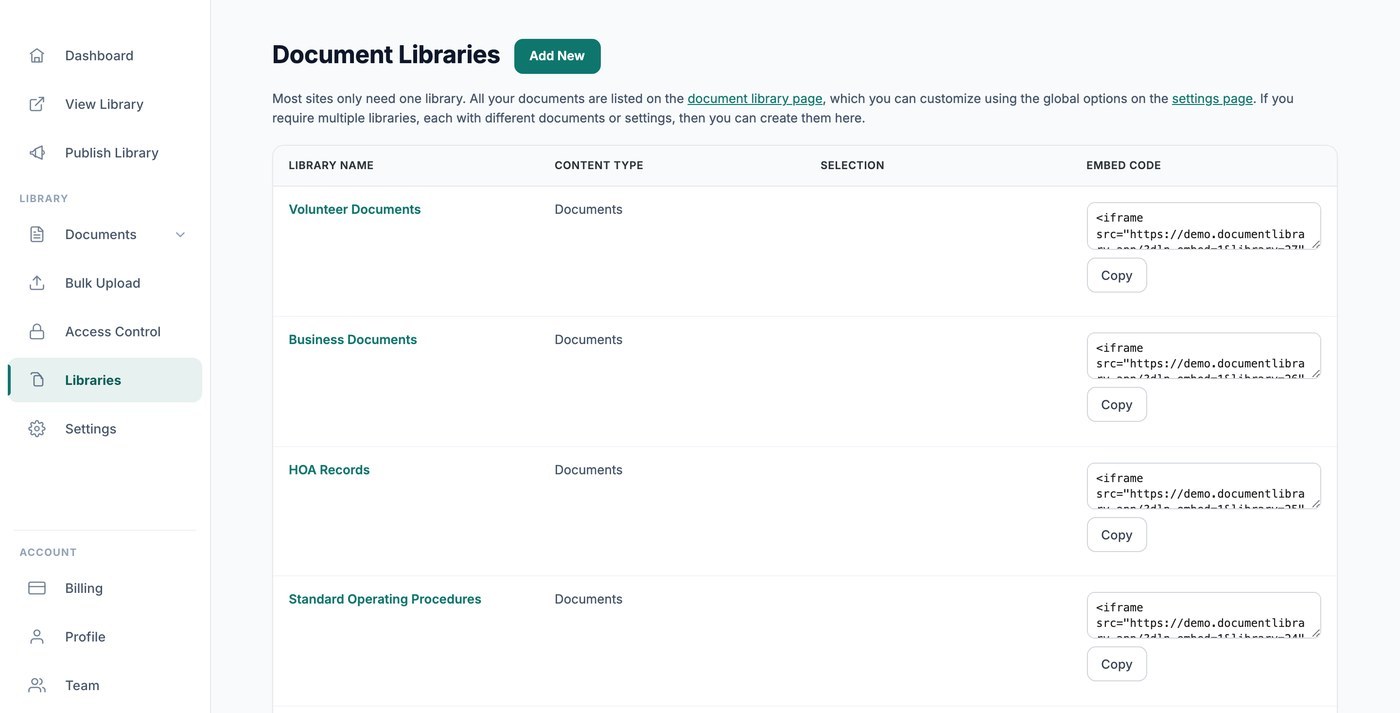
La plupart des sites n’ont besoin que d’une seule bibliothèque, où se trouvent tous vos documents et qui est contrôlée par vos réglages globaux. Cette bibliothèque principale est publiée et intégrée depuis la Publier la bibliothèque page, et l’ Bibliothèques écran reste vide jusqu’à ce que vous créiez des bibliothèques supplémentaires. Si vous avez besoin de bibliothèques séparées avec des documents ou des réglages différents, vous pouvez en créer autant que vous le souhaitez ici.
Quand utiliser plusieurs bibliothèques
Plusieurs bibliothèques sont utiles lorsque vous souhaitez afficher différents ensembles de documents à différents endroits, par exemple une bibliothèque publique de politiques sur une page et une bibliothèque de formulaires protégée par mot de passe sur une autre.
Créer une nouvelle bibliothèque
Ouvrir le Bibliothèques écran et cliquez sur Créer une bibliothèque. Un court assistant vous permet de nommer la bibliothèque, de choisir les documents qu’elle contient, par catégorie ou étiquette, et de définir ses colonnes, ses filtres, sa mise en page et son tri.
Intégrer une bibliothèque précise
Chaque bibliothèque supplémentaire que vous créez ici possède son propre code d’intégration, qui inclut une référence de bibliothèque afin que la bonne bibliothèque apparaisse. Copiez-le depuis la Code d'intégration colonne à côté de la bibliothèque, puis ajoutez-le à votre site comme n’importe quelle autre intégration. (Le code d’intégration de votre bibliothèque principale se trouve sur la page Publier la bibliothèque, pas ici.)
Chaque bibliothèque obtient sa propre page
Chaque bibliothèque que vous créez obtient également sa propre page à l’adresse web de votre bibliothèque, afin que vous puissiez créer un lien direct vers celle-ci ou l’intégrer, selon ce qui vous convient.
Choisir les documents affichés par une bibliothèque
Fonctionnement du périmètre dans le Générateur de bibliothèque
Lorsque vous créez ou modifiez une bibliothèque depuis l’écran Bibliothèques, le Générateur de bibliothèque vous guide dans le choix des documents qui lui appartiennent. Vous pouvez garder une bibliothèque totalement ouverte afin qu’elle liste tout ce que vous avez téléversé, ou la limiter à des catégories et étiquettes spécifiques. Chaque bibliothèque que vous créez obtient sa propre intégration et sa propre page sur votre site hébergé, ce qui vous permet de publier plusieurs bibliothèques ciblées côte à côte, chacune limitée à un contenu différent.
Limiter par catégorie
La façon la plus courante de contrôler une bibliothèque est par catégorie. Dans le Générateur de bibliothèque, choisissez les catégories que vous souhaitez inclure dans la bibliothèque. Les documents classés dans ces catégories apparaîtront, et tout le reste sera exclu. C’est pratique lorsque vous conservez des collections séparées telles que “Design”, “Print” ou “Policies” et que vous souhaitez une bibliothèque dédiée pour chacune.
Si vous sélectionnez plusieurs catégories, la bibliothèque affiche les documents qui appartiennent à l’une ou l’autre des catégories choisies.
Limiter par étiquette
Vous pouvez également restreindre une bibliothèque par étiquette. Les étiquettes fonctionnent avec les catégories, ce qui vous permet de créer une bibliothèque qui récupère tout ce qui porte une étiquette particulière, quelle que soit sa catégorie. Choisissez les étiquettes souhaitées dans le Générateur et la bibliothèque listera les documents correspondants.
Combiner catégories et étiquettes
Les catégories et les étiquettes peuvent être utilisées ensemble pour affiner une bibliothèque. Par exemple, vous pouvez limiter une bibliothèque à une catégorie “Reports”, puis la restreindre davantage aux documents étiquetés “2025” afin que la bibliothèque n’affiche que les rapports de cette année-là. Ajustez les sélections dans le Générateur jusqu’à ce que l’aperçu affiche les documents attendus.
Séparer le contenu en dossiers
Si vous préférez tout garder au même endroit tout en permettant aux visiteurs d’explorer en détail, vous pouvez passer une bibliothèque en vue par dossiers à l’étape Mise en page du Créateur de bibliothèque. Les dossiers regroupent les documents par catégorie et sous-catégorie afin que les utilisateurs puissent ouvrir un dossier à la fois au lieu de faire défiler une longue liste unique. C’est une bonne alternative à la création de plusieurs bibliothèques séparées lorsque tout le contenu va ensemble.
Créer plusieurs bibliothèques ciblées
Comme chaque bibliothèque est indépendante, le moyen le plus simple d’afficher différents ensembles de documents à différents endroits consiste à créer une bibliothèque séparée pour chaque ensemble et à définir son périmètre en conséquence. Chaque bibliothèque que vous créez depuis l’écran Bibliothèques produit son propre code d’intégration et sa propre page, ce qui vous permet de placer chacune là où vous en avez besoin en ayant l’assurance qu’elle n’affiche que les documents choisis lors de sa création.