





Hay dos formas de añadir una biblioteca de Document Library Pro a un sitio Wix. La opción más sencilla es usar la Aplicación Document Library Pro para Wix, que añade la biblioteca como widget de Wix. El código de inserción universal sigue funcionando si prefieres añadir la biblioteca manualmente. Este artículo explica primero el método de la aplicación de Wix y después el método del código de inserción.
Añadir la biblioteca con la aplicación de Wix
- Instala la app Document Library Pro desde Wix App Market. Elige un plan para iniciar tu prueba gratuita de 14 días, que se factura a través de Wix. La aplicación crea tu biblioteca de documentos.
- Abre el correo electrónico de bienvenida y haz clic en Establecer tu contraseña. Así es como inicias sesión para gestionar tus documentos.
- Abre en el editor de Wix la página donde quieres mostrar la biblioteca.
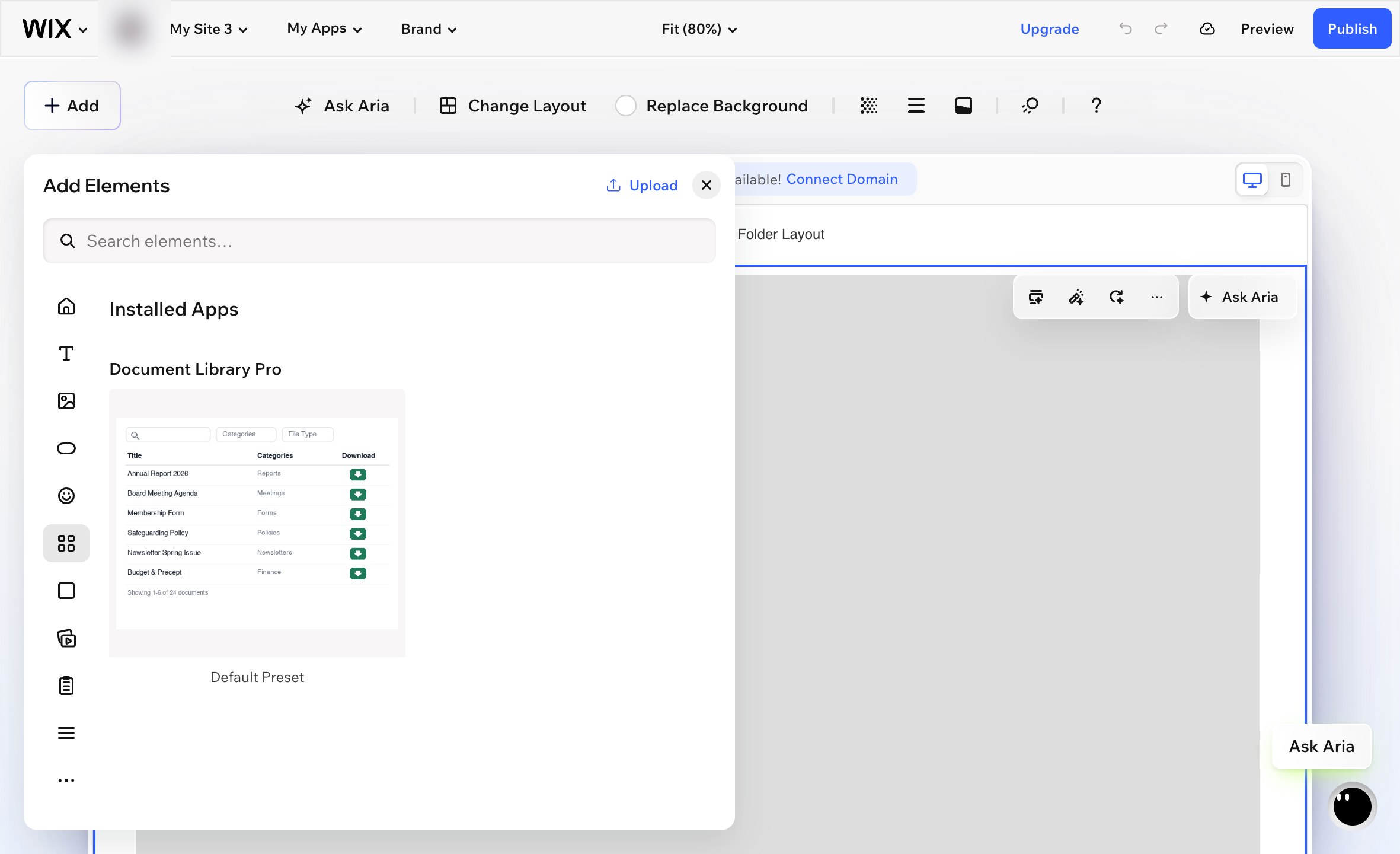
- Ir a Añadir → Elementos.
- Desplázate hasta la Aplicaciones instaladas sección y elige Document Library Pro. Ten en cuenta que el widget no aparecerá si escribes su nombre en el Añadir cuadro de búsqueda. Tienes que usar la Aplicaciones instaladas sección.
- Wix añade el widget como un cuadro pequeño en el centro de la página. Arrastra el widget a su posición y redimensiónalo para llenar el área donde quieres que aparezca la biblioteca de documentos.
- Selecciona el widget y haz clic en el icono de engranaje para abrir sus ajustes.
- bajo Library, elige la biblioteca de documentos que quieres mostrar en esta página.
- Publica tu sitio Wix.
página Tus documentos
La aplicación también añade una Documents página lista para usar a tu sitio, que incluye todos tus documentos. Publica tu sitio de Wix para activarlo. La página es una página normal de Wix, así que puedes cambiarle el nombre, moverla en tu menú o añadir tu propio texto encima y debajo de la biblioteca.
Dónde gestionas tu biblioteca
Tus documentos y bibliotecas se encuentran en la plataforma Document Library Pro, y la aplicación los muestra en tu sitio de Wix. Abre Document Library Pro desde tu escritorio de Wix para ir directamente a tu cuenta, donde puedes añadir y editar documentos, crear bibliotecas adicionales y cambiar tu ajustes.
Si falla un pago o se elimina la aplicación, tu biblioteca se pausa en lugar de eliminarse. Vuelve a instalar la aplicación o elige un plan de nuevo y tus documentos seguirán donde los dejaste.
Añadir la biblioteca con código de incrustación
También puedes añadir tu biblioteca de Document Library Pro a Wix usando el código de incrustación universal. Esto resulta útil si prefieres controlar la incrustación manualmente en lugar de usar la aplicación de Wix.
- Abre tu panel de Document Library Pro y ve a la Publicar biblioteca sección de la biblioteca que quieres mostrar.
- Copia el código de incrustación.
- En Wix, ve a Pages And Menu y crea una página en blanco nueva.
- Añade un Embed Code elemento. Este es el elemento de incrustación HTML en Wix.
- Pega el código de incrustación de Document Library Pro en el elemento.
- Redimensiona el elemento de incrustación a ancho completo y define una altura adecuada. Unos 700px es un punto de partida razonable. Las bibliotecas más grandes pueden necesitar más altura.
- Publica tu sitio Wix.
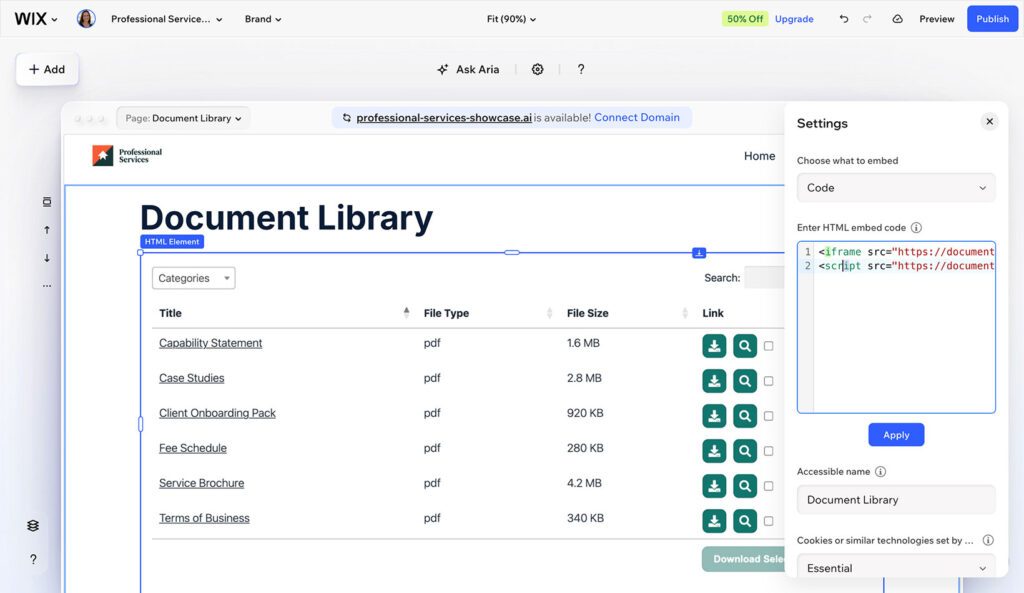
El tamaño del elemento de incrustación es importante. Si el elemento es demasiado pequeño, la biblioteca puede desplazarse dentro del cuadro de incrustación o contraerse en una sola columna.
El código de incrustación no muestra la biblioteca de documentos en vivo dentro del editor de Wix. Para ver la biblioteca terminada, revisa tu sitio publicado.
Siguientes pasos
Si todavía no has creado tu biblioteca de documentos, configúrala primero en tu panel de Document Library Pro. Después vuelve a Wix y elige el método de la aplicación o el método de código de incrustación anteriores.