





Es ist wichtig, deine Bibliothek aktuell zu halten, damit Besucher immer die neueste Version jeder Datei erreichen. Wenn sich ein Dokument in deiner Organisation ändert, kannst du mit deiner gehosteten Document Library Pro Bibliothek schnell die neue Version austauschen. Dokumente, die von einem Google Drive- oder Dropbox-Ordner synchronisiert werden, aktualisieren sich selbst: Ersetze einfach die Datei im Ordner, und die Änderung wird automatisch synchronisiert.
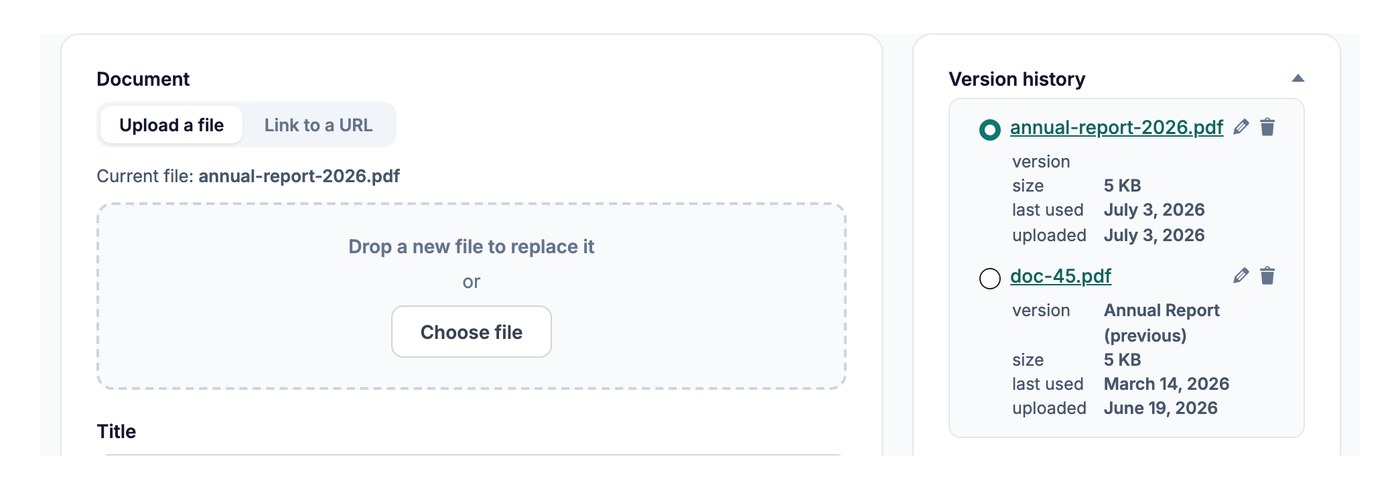
Die Datei des Dokuments ersetzen
Um ein Dokument zu aktualisieren, öffne es unter Dokumente → Meine Dokumente und ersetze seine Datei:
- Öffne das Dokument, das du aktualisieren möchtest, in deinem Dashboard.
- Klicken Datei ersetzen und lade die neue Version hoch oder füge einen neuen Link ein, wenn die Datei an anderer Stelle online liegt.
- Speichere das Dokument.
Der Download-Link verweist jetzt auf die aktualisierte Datei, ohne dass weitere Änderungen nötig sind.
Ältere Versionen behalten
Wenn die Versionskontrolle aktiviert ist und Dateien ersetzen auf Original behalten eingestellt ist, bleibt die frühere Datei beim Ersetzen gespeichert. So kannst du später nachvollziehen, was sich geändert hat. Die Versionskontrolle ist eine Advanced plan Feature.