





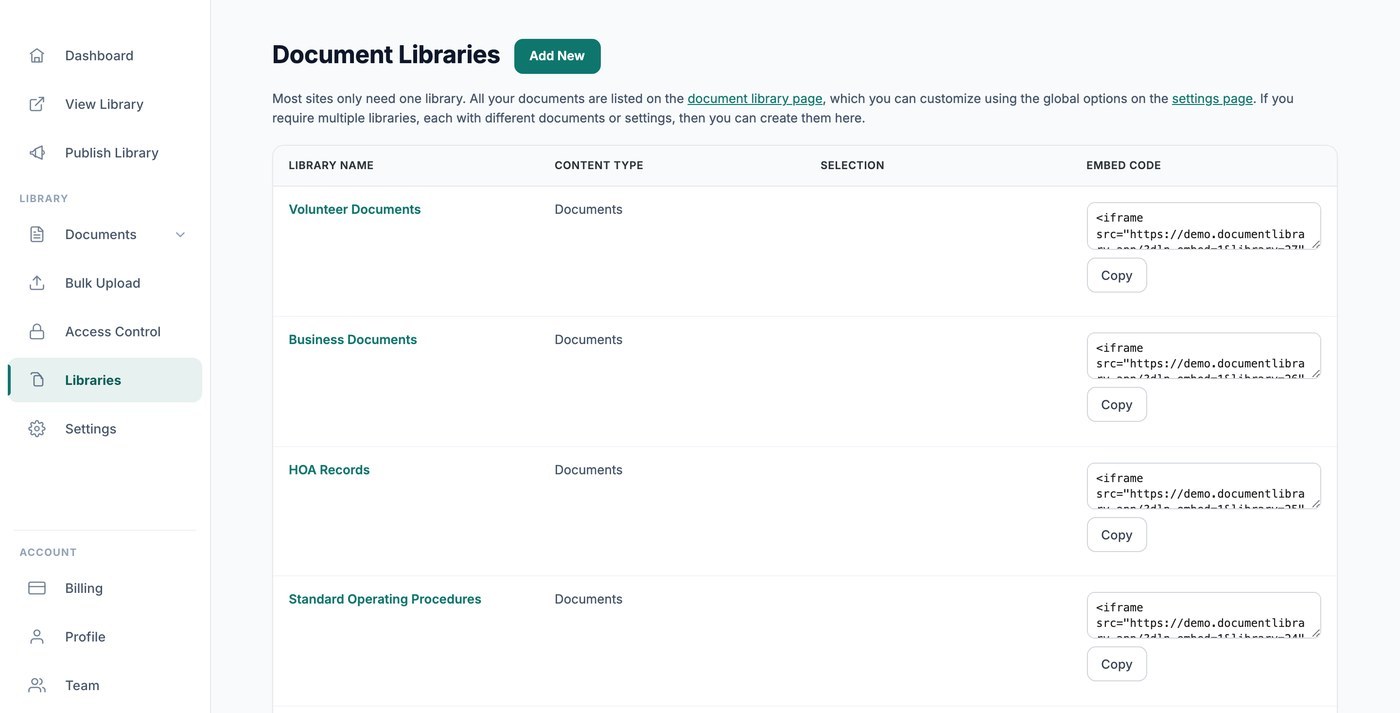
La mayoría de los sitios solo necesitan una biblioteca, donde están todos tus documentos y se controlan con tus ajustes globales. Esa biblioteca principal se publica e inserta desde la Publicar biblioteca página, y la Libraries pantalla está vacía hasta que creas bibliotecas adicionales. Si necesitas bibliotecas separadas con documentos o ajustes distintos, puedes crear aquí tantas como quieras.
Cuándo usar varias bibliotecas
Las bibliotecas múltiples son útiles cuando quieres mostrar distintos grupos de documentos en diferentes lugares, por ejemplo una biblioteca pública de políticas en una página y una biblioteca de formularios protegida con contraseña en otra.
Crear una biblioteca nueva
Abrir el Libraries pantalla y haz clic en Crear biblioteca. Un asistente breve te permite poner nombre a la biblioteca, elegir qué documentos contiene, por categoría o etiqueta, y configurar sus columnas, filtros, diseño y ordenación.
Insertar una biblioteca concreta
Cada biblioteca adicional que crees aquí tiene su propio código de inserción, que incluye una referencia de biblioteca para que aparezca la correcta. Cópialo de la Embed Code columna junto a la biblioteca, y luego añádelo a tu sitio igual que cualquier otra inserción. (El código de inserción de tu biblioteca principal está en la página Publicar biblioteca, no aquí.)
Cada biblioteca tiene su propia página
Cada biblioteca que crees también tiene su propia página en la dirección web de tu biblioteca, así que puedes enlazarla directamente o insertarla, lo que te convenga.
Elegir qué documentos muestra una biblioteca
Cómo funciona el alcance en el Constructor de bibliotecas
Cuando creas o editas una biblioteca desde la pantalla Bibliotecas, el Constructor de bibliotecas te guía para elegir los documentos que pertenecen a ella. Puedes dejar una biblioteca totalmente abierta para que liste todo lo que has subido, o limitarla a categorías y etiquetas específicas. Cada biblioteca que creas obtiene su propia incrustación y su propia página en tu sitio alojado, por lo que puedes publicar varias bibliotecas enfocadas una junto a otra, cada una limitada a contenido diferente.
Limitar por categoría
La forma más habitual de controlar una biblioteca es por categoría. En el Constructor de bibliotecas, elige las categorías que quieres que incluya la biblioteca. Aparecerán los documentos archivados en esas categorías y todo lo demás quedará fuera. Esto resulta útil cuando tienes colecciones separadas como “Diseño”, “Impresión” o “Políticas” y quieres una biblioteca dedicada para cada una.
Si seleccionas más de una categoría, la biblioteca muestra documentos que pertenecen a cualquiera de las categorías elegidas.
Limitar por etiqueta
También puedes acotar una biblioteca por etiqueta. Las etiquetas funcionan junto con las categorías, así que puedes crear una biblioteca que incluya todo lo que tenga una etiqueta concreta, independientemente de la categoría en la que esté. Elige las etiquetas que quieres en el Constructor y la biblioteca listará los documentos coincidentes.
Combinar categorías y etiquetas
Las categorías y las etiquetas pueden usarse juntas para ajustar una biblioteca con más precisión. Por ejemplo, podrías limitar una biblioteca a una categoría “Informes” y después limitarla aún más a documentos etiquetados como “2025”, para que la biblioteca solo muestre los informes de ese año. Ajusta las selecciones en el Constructor hasta que la vista previa muestre los documentos que esperas.
Separar contenido en carpetas
Si prefieres mantenerlo todo en un mismo lugar y permitir que los visitantes exploren el contenido, puedes cambiar una biblioteca a la vista de carpetas en el paso Layout del Library Builder. Las carpetas agrupan los documentos por categoría y subcategoría, para que las personas puedan abrir una carpeta cada vez en lugar de desplazarse por una lista larga. Es una buena alternativa a crear varias bibliotecas separadas cuando todo el contenido está relacionado.
Crear varias bibliotecas enfocadas
Como cada biblioteca es independiente, la forma más sencilla de mostrar conjuntos de documentos diferentes en lugares diferentes es crear una biblioteca separada para cada conjunto y limitarla en consecuencia. Cada biblioteca que creas desde la pantalla Bibliotecas genera su propio código de incrustación y su propia página, por lo que puedes colocar cada una donde la necesites y tener la seguridad de que solo muestra los documentos que elegiste al crearla.