





Die Einbetten-Komponente von Framer ist alles, was du brauchst, um deine gehostete Dokumentbibliothek auf einer beliebigen Seite einzufügen. Die folgenden Schritte führen dich von Anfang bis Ende durch den Prozess.
Bevor du beginnst: Du kannst die Einbetten-Komponente im kostenlosen Framer-Tarif verwenden, und deine Bibliothek erscheint, sobald die Website veröffentlicht ist. Beachte, dass kostenlose Websites unter einer framer.website-Adresse veröffentlicht werden und ein kleines “Made in Framer”-Badge tragen. Der Wechsel zu einem kostenpflichtigen Framer-Tarif entfernt dieses Badge und schaltet deine eigene benutzerdefinierte Domain frei.
Schritt 1: Kopiere deinen Einbettungscode
Öffne in deinem gehosteten Dashboard Publish Library , um deinen Einbettungscode zu finden, und kopiere ihn dann. Die meisten Websites haben eine einzige Bibliothek, und auf der Seite Bibliothek veröffentlichen befindet sich ihr Einbettungscode. (Wenn du mehr als eine Bibliothek erstellt hast, kopiere stattdessen den Code für die gewünschte Bibliothek aus dem Libraries Bildschirm.) Füge immer den exakten Code aus deinem eigenen Dashboard ein, nicht das Beispiel unten:
<iframe src="https://your-library.documentlibrary.app/?dlp_embed=1" title="Document library" style="width:100%;border:0;height:600px;" loading="lazy"></iframe>
<script src="https://your-library.documentlibrary.app/?dlp_embed_resize=1" async></script>
Schritt 2: Öffne die Seite für deine Bibliothek
Navigiere im Framer-Editor zu der Seite, die die Bibliothek enthalten soll. Wenn du lieber eine neue Seite verwenden möchtest, erstelle eine im Seiten-Panel und gib ihr einen eindeutigen Namen wie Dokumentenbibliothek.
Schritt 3: Füge eine Einbetten-Komponente hinzu
Wähle Einfügen, gib Einbetten in das Suchfeld ein und ziehe die Einbetten Komponente an die Stelle, an der die Bibliothek sitzen soll.
Schritt 4: Füge deinen Einbettungscode ein
Lass die Einbetten-Komponente ausgewählt, damit ihre Einstellungen rechts erscheinen. Ändere den Typ von URL zu HTML, und füge dann den Code aus Schritt 1 in das HTML ein.
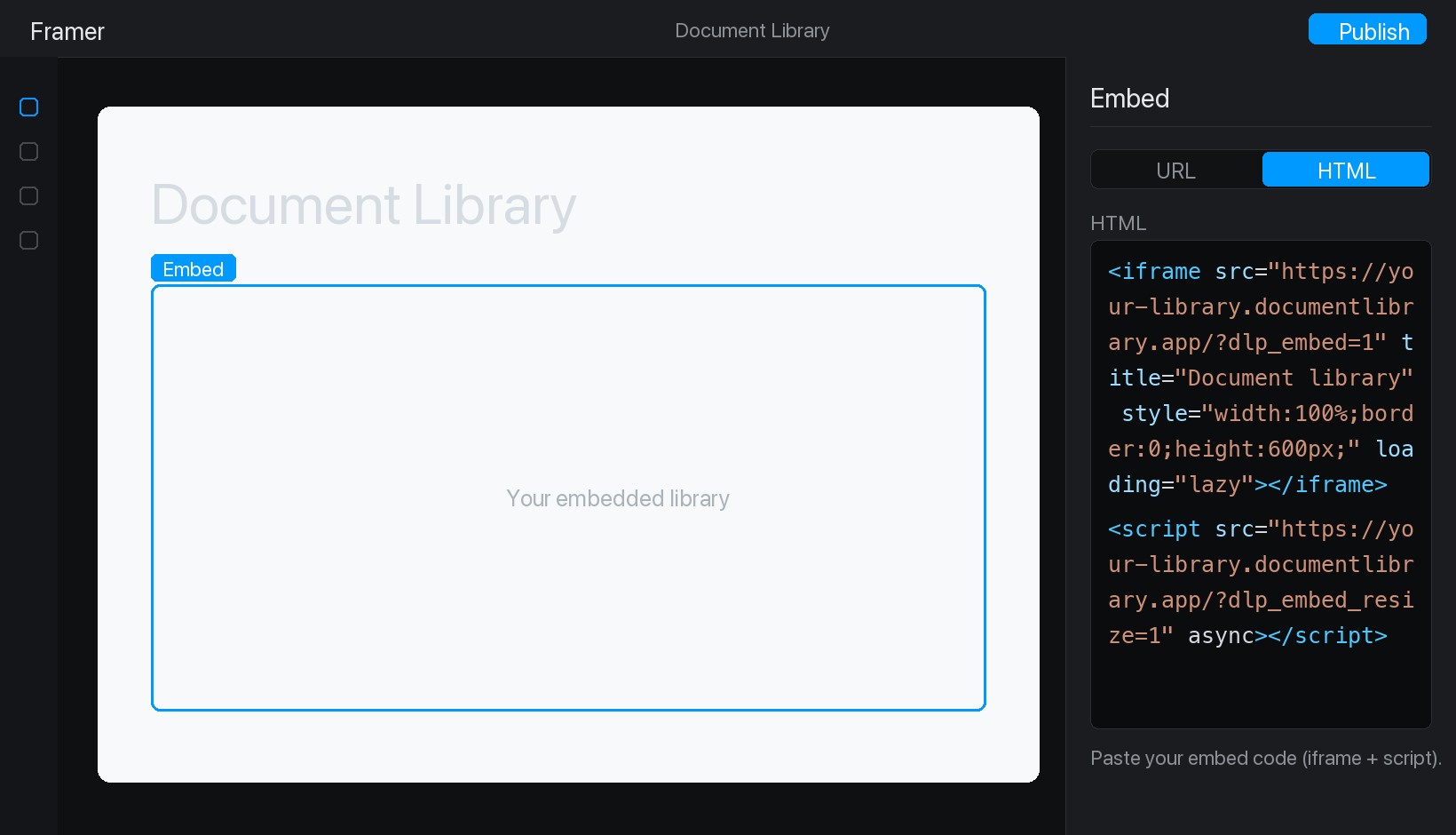
Schritt 5: Veröffentliche deine Bibliothek und sieh sie dir an
Drück Veröffentlichen oben rechts und öffne anschließend deine Live-Website. Deine Dokumentbibliothek ist jetzt eingebunden, und Besucher können darin suchen, nach Kategorie filtern und jedes Dokument in der Vorschau ansehen oder herunterladen.