





Puedes invitar a otras personas para que te ayuden a gestionar tu biblioteca de documentos alojada, algo útil cuando más de una persona se encarga de tus documentos.
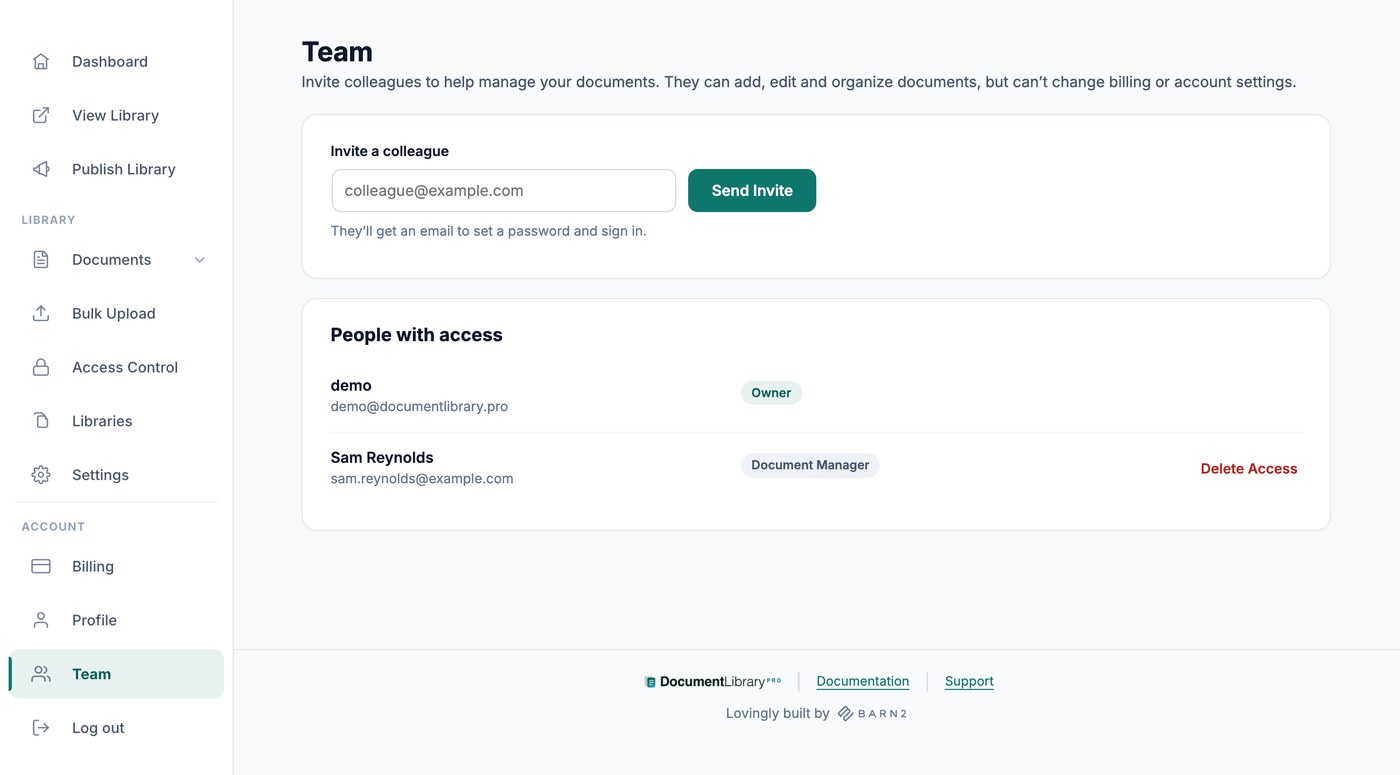
Invitar a un miembro del equipo
Abre Team desde la sección Cuenta del menú de tu panel e invita a las personas que quieras añadir.
Introduce su dirección de correo electrónico en Invitar a un compañero y haz clic Enviar invitación. Recibirá un correo electrónico para establecer una contraseña e iniciar sesión.
Todas las personas con acceso aparecen en Personas con acceso, con su función junto a su nombre: Propietario para ti, y Gestor de documentos para las personas que invites. Quien todavía no haya iniciado sesión aparece como Invitación pendiente.
Qué pueden hacer los miembros del equipo
Los miembros del equipo que invites pueden añadir, editar e importar documentos, categorías, etiquetas y autores, así que pueden gestionar por completo el contenido de tu biblioteca.
Qué no pueden hacer los miembros del equipo
Los gestores de documentos solo ven las partes del escritorio que contienen documentos. Publish Library, Libraries, Access Control, Settings, Billing y Team solo están disponibles para ti como propietario de la cuenta, por lo que nadie cambiará por accidente tu suscripción, tu código de inserción ni tus ajustes globales.
Eliminar el acceso de una persona
En la pantalla Team, haz clic en Eliminar acceso junto a la persona que quieras eliminar. Ya no podrá iniciar sesión y los documentos que haya añadido permanecerán en tu biblioteca.